

Cart
0

Ts X13 G2 I7 16G 512G 10P
Free Standard Shipping Across USA
Vendor: Lenovo
Type: Business Laptops
Sku: WBCOMB09LRDXXVT
Availability: Sold Out
Couldn't load pickup availability
Guarantee safe checkout

Sold by Electroeshop, an authorized reseller.
Returns accepted within 30 days | support@electroeshop.com
Shipping Information
- Free Standard Shipping — United States only
- Processing Time: 3–5 business days
- Estimated Delivery: 6–10 business days after dispatch
- Double-boxed, fully insured & discreetly packaged
- Tracking number sent via email once dispatched
Returns & Refund
Returns accepted within 30 days of delivery.
Damaged or Defective Item
Free return shipping + replacement or full refund
Wrong Item Received
Free return shipping + replacement or full refund
Change of Mind
Return shipping at customer's expense · 25% restocking fee applies
All returns require a Return Authorization (RA) number before sending.
View Full Return & Refund Policy
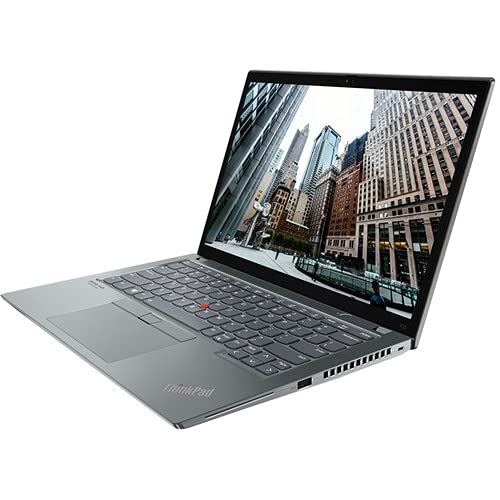
Ts X13 G2 I7 16G 512G 10P
$1,826.18

Frequently Asked Questions
- Q: What are the dimensions of the Lenovo ThinkPad X13 Gen 2? A: The Lenovo ThinkPad X13 Gen 2 measures eight point six inches in length, twelve point zero one inches in width, and zero point seventy one inches in height. This compact size makes it highly portable.
- Q: What type of processor does this laptop have? A: This laptop is equipped with an Intel Core i7 11th Generation processor, specifically the i7-1165G7 model. It features four cores and operates at a base speed of two point eighty gigahertz.
- Q: How much RAM does the Lenovo ThinkPad X13 Gen 2 have? A: The laptop comes with sixteen gigabytes of total RAM. This allows for efficient multitasking and enhances overall performance.
- Q: How do I use the touch screen on this laptop? A: To use the touch screen, simply tap, swipe, or pinch as you would on a smartphone. The touch screen enhances user interaction, making navigation intuitive.
- Q: Is the Lenovo ThinkPad X13 Gen 2 suitable for gaming? A: While this laptop can handle casual games due to its Intel Iris Xe Graphics, it is primarily designed for productivity rather than high-end gaming. Users seeking advanced gaming performance may want to consider a dedicated gaming laptop.
- Q: Can I upgrade the RAM on the Lenovo ThinkPad X13 Gen 2? A: No, the RAM is soldered onto the motherboard and cannot be upgraded. It's advisable to choose the desired RAM configuration at the time of purchase.
- Q: How do I clean the Lenovo ThinkPad X13 Gen 2? A: To clean the laptop, use a microfiber cloth dampened with water or a mild cleaning solution. Avoid using abrasive materials that could scratch the screen or body.
- Q: What is the battery life of the Lenovo ThinkPad X13 Gen 2? A: The battery life can last up to fourteen hours depending on usage. This long battery life is ideal for users who are frequently on the go.
- Q: Is the Lenovo ThinkPad X13 Gen 2 good for business use? A: Yes, this laptop is designed specifically for business professionals with its lightweight design, long battery life, and robust performance features. It is an excellent choice for productivity tasks.
- Q: What is the warranty on the Lenovo ThinkPad X13 Gen 2? A: The standard warranty for this laptop is one year. Extended warranty options may be available at the time of purchase for added coverage.
- Q: Can I connect external displays to this laptop? A: Yes, the Lenovo ThinkPad X13 Gen 2 features an HDMI port and two USB Type-C ports, allowing connections to external monitors. This enhances productivity by enabling multiple display setups.
- Q: How do I install software on the Lenovo ThinkPad X13 Gen 2? A: To install software, download the application from a trusted source and follow the on-screen instructions. You can also use installation media if available.
- Q: What operating system does the Lenovo ThinkPad X13 Gen 2 come with? A: The laptop comes pre-installed with Windows ten Pro. This operating system provides a user-friendly interface and supports a wide range of applications.
- Q: What should I do if my laptop arrives damaged? A: If your laptop arrives damaged, contact the retailer's customer service immediately for assistance. Most retailers have a return policy that allows for exchanges or repairs.
- Q: Does this laptop have a fingerprint reader for security? A: Yes, the Lenovo ThinkPad X13 Gen 2 is equipped with a fingerprint reader. This feature enhances security by allowing secure login with your fingerprint.