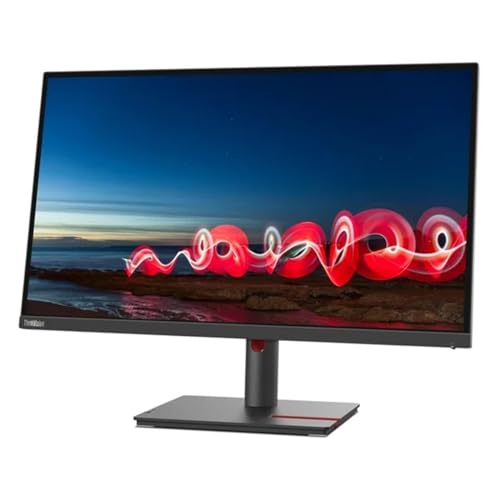
27'' Qhd (2560 X 1440) 3-Side Near-Edgeless Display; Eye-Caring Display With Natural Low Blue Light; Daisy Chain Capability; Built-In Rj45; Ergonomic Stand|499|0|Both|Long|Warning: This Product Can Expose You To Chemicals Including Lead, Which Is Known To The State Of California To Cause Cancer And Birth Defects Or Other Reproductive Harm. For More Information Go To Www.P65Warnings.Ca.Gov.
⚠️ WARNING (California Proposition 65): This product may contain chemicals known to the State of California to cause cancer, birth defects, or other reproductive harm. For more information, please visit www.P65Warnings.ca.gov.
Frequently Asked Questions
Q: What is the resolution of the Lenovo 27IN QHD monitor?A: The resolution is two thousand five hundred sixty by one thousand four hundred forty pixels. This QHD display provides stunning clarity and detail for all your viewing needs.
Q: What are the dimensions of the Lenovo 27IN monitor?A: The dimensions are fourteen point three inches high, twenty-four point two inches wide, and two inches deep. This size makes it ideal for various desk setups.
Q: What is the weight of the Lenovo 27IN monitor?A: The weight is twenty-two point one hundred pounds. This weight is manageable for most users, making it easier to fit into your workspace.
Q: What type of display technology does the Lenovo monitor use?A: The monitor uses In-Plane Switching (IPS) technology. This provides wide viewing angles and vibrant colors for an enhanced visual experience.
Q: What color is the Lenovo 27IN monitor?A: The monitor comes in white. This neutral color fits well with various home and office environments.
Q: What is the item size for the Lenovo monitor?A: The item size is fourteen point three inches by twenty-four point two inches by two inches. This compact size is suitable for limited spaces.
Q: How do I set up the Lenovo 27IN monitor?A: To set it up, connect the monitor to your computer using the appropriate cable and power it on. Follow the on-screen instructions to adjust settings as needed.
Q: Is the Lenovo 27IN monitor suitable for gaming?A: Yes, it is suitable for gaming. The QHD resolution and IPS technology provide smooth visuals and accurate colors for an immersive gaming experience.
Q: Can I use the Lenovo monitor for graphic design?A: Yes, this monitor is excellent for graphic design. The high resolution and color accuracy make it a great choice for creative professionals.
Q: How do I clean the Lenovo 27IN monitor screen?A: To clean the screen, use a microfiber cloth slightly dampened with water or a screen cleaner. Avoid using harsh chemicals to prevent damage.
Q: What is the warranty on the Lenovo 27IN monitor?A: The warranty typically lasts one year. This covers manufacturing defects and ensures a reliable product experience.
Q: Is the Lenovo monitor compatible with Mac computers?A: Yes, the Lenovo monitor is compatible with Mac computers. Ensure you have the right cables to connect it to your device.
Q: What if my Lenovo monitor arrives damaged?A: If the monitor arrives damaged, contact customer support for assistance. They will guide you through the return or replacement process.
Q: How do I adjust the brightness on the Lenovo monitor?A: To adjust brightness, use the on-screen display menu accessed via the buttons located on the monitor. Navigate to the brightness settings.
Q: Can I mount the Lenovo 27IN monitor on a wall?A: Yes, you can mount it on a wall. Ensure you check the VESA mount compatibility for proper installation.