

Cart
0


T24V 30 23.8'' Monitor Hdmi|Thinkvision T24V 30 23.8'' Fhd Ips Panel With Natural Low Blue Light ; 2Mp Ir+Rgb Camera With Window
Free Standard Shipping Across USA
Vendor: Lenovo
Type: Monitors & Displays
Sku: WBEEAB0C8BHWKKB
Availability: Sold Out
Couldn't load pickup availability
Guarantee safe checkout

Sold by Electroeshop, an authorized reseller.
Returns accepted within 30 days | support@electroeshop.com
Shipping Information
- Free Standard Shipping — United States only
- Processing Time: 3–5 business days
- Estimated Delivery: 6–10 business days after dispatch
- Double-boxed, fully insured & discreetly packaged
- Tracking number sent via email once dispatched
Returns & Refund
Returns accepted within 30 days of delivery.
Damaged or Defective Item
Free return shipping + replacement or full refund
Wrong Item Received
Free return shipping + replacement or full refund
Change of Mind
Return shipping at customer's expense · 25% restocking fee applies
All returns require a Return Authorization (RA) number before sending.
View Full Return & Refund Policy
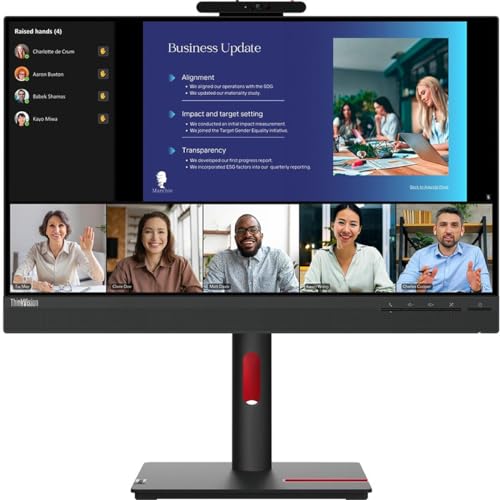
T24V 30 23.8'' Monitor Hdmi|Thinkvision T24V 30 23.8'' Fhd Ips Panel With Natural Low Blue Light ; 2Mp Ir+Rgb Camera With Window
$248.11

Frequently Asked Questions
- Q: What are the dimensions of the Lenovo ThinkVision T24v-30 monitor? A: The dimensions of the Lenovo ThinkVision T24v-30 monitor are approximately two point thirteen inches in height, twenty-one point twenty-six inches in width, and thirteen point sixty-two inches in depth.
- Q: What is the screen size of the Lenovo ThinkVision T24v-30? A: The screen size of the Lenovo ThinkVision T24v-30 is twenty-three point eight inches, providing an excellent viewing experience.
- Q: What is the maximum resolution of this monitor? A: The maximum resolution of the Lenovo ThinkVision T24v-30 is one thousand nine hundred twenty by one thousand eighty pixels, ensuring a vivid display.
- Q: What technology does the Lenovo ThinkVision T24v-30 monitor use? A: The Lenovo ThinkVision T24v-30 monitor uses In-plane Switching (IPS) technology, which enhances color accuracy and viewing angles.
- Q: How do I connect the Lenovo ThinkVision T24v-30 to my computer? A: You can connect the Lenovo ThinkVision T24v-30 monitor to your computer using HDMI, VGA, or DisplayPort connections.
- Q: Is the Lenovo ThinkVision T24v-30 monitor suitable for gaming? A: Yes, the Lenovo ThinkVision T24v-30 monitor is suitable for gaming due to its four millisecond response time and seventy-five hertz refresh rate.
- Q: Does the Lenovo ThinkVision T24v-30 have a built-in webcam? A: Yes, the Lenovo ThinkVision T24v-30 features a built-in webcam for face-to-face communications and video conferencing.
- Q: How can I adjust the settings on the Lenovo ThinkVision T24v-30 monitor? A: You can adjust the settings on the Lenovo ThinkVision T24v-30 monitor using the on-screen display menu, accessible via the buttons located on the monitor.
- Q: What is the brightness level of the Lenovo ThinkVision T24v-30 monitor? A: The brightness level of the Lenovo ThinkVision T24v-30 monitor is two hundred fifty nits, providing clear visuals even in bright environments.
- Q: How do I clean the screen of the Lenovo ThinkVision T24v-30? A: To clean the screen of the Lenovo ThinkVision T24v-30, use a microfiber cloth slightly dampened with water or a screen-safe cleaner, avoiding harsh chemicals.
- Q: What is the warranty period for the Lenovo ThinkVision T24v-30 monitor? A: The warranty period for the Lenovo ThinkVision T24v-30 monitor is typically three years, covering manufacturing defects and issues.
- Q: Can I mount the Lenovo ThinkVision T24v-30 on a wall? A: Yes, the Lenovo ThinkVision T24v-30 is VESA mount compatible, allowing you to mount it on a wall or an adjustable arm.
- Q: What types of users is the Lenovo ThinkVision T24v-30 monitor suitable for? A: The Lenovo ThinkVision T24v-30 monitor is suitable for various users, including professionals, gamers, and anyone in need of a high-quality display for work or entertainment.
- Q: What should I do if my Lenovo ThinkVision T24v-30 monitor arrives damaged? A: If your Lenovo ThinkVision T24v-30 monitor arrives damaged, you should contact the retailer or manufacturer immediately to initiate a return or exchange.
- Q: How can I ensure the longevity of my Lenovo ThinkVision T24v-30 monitor? A: To ensure the longevity of your Lenovo ThinkVision T24v-30 monitor, keep it in a cool, dry place, avoid exposure to direct sunlight, and clean it regularly.