4U Wallmount Design Equipment Can Be Vertically Wall Mounted, Or Horizontally Under A Desk Taa Compliant For Gsa Schedule Purchases Arrives Fully Assembled With Cage Screws And Nuts For Mounting Equipment Wall Mounting Holes Are 16 Center To Center For Greater Stability, And Mounting To Standard Wall Studs Constructed To Meet The Eia-310 19'' Rack Standards Made From Solid Steel For Durability The Rk419Wallv 4U Wallmount Rack Bracket Offers A Versatile Storage Solution, Allowing Equipment (Network Devices, Power Strips, Patch Panels) To Be Mounted Vertically (Flush With The Wall) To Save Space. Alternatively, The 4U Bracket Can Be Installed Under A Desk For Horizontal Installation, Making It Easy To Access Installed Equipment Directly From Your Workspace. This Taa Compliant Product Adheres To The Requirements Of The Us Federal Trade Agreements Act (Taa), Allowing Government Gsa Schedule Purchases. Perfect For Soho (Small Office, Home Office) Environments, The Wallmount Bracket Offers Space-Saving Installation For Environments Lacking The Footprint Space For A Full Size Server Equipment Rack. Suitable For Mounting On Virtually Any Wall/Ceiling Surface (E.G. Drywall), The Bracket Mounting Holes (Used To Mount To A Wall Or The Desk Underside) Are Positioned At Exactly 16In Apart, Matching Standard Construction Framework. Constructed To Eia-310 19In Rack Standards, The Wallmount Bracket Features A Sturdy Steel Design And Is Backed By Startech.Com'S Lifetime Warranty. Need More Storage Space? Startech.Com Also Offers A 1U 19In Wallmount Bracket, A 2U 19In Wallmount Bracket And A 3U 19In Wallmount Bracket. Mount Networking And Telecommunication Equipment Flush Against The Wall Mount Kvm Switches Or Workstations Under A Desk Or Work Bench To Free Up Work Space Ideal For Small And Medium Businesses Needing Rack Solutions Save Space By Mounting It Or Av Equipment Directly To The Wall Quick And Easy Setup With The Included Cage Screws And Nuts For Mounting Equipment Specifications Warranty Information Warranty Lifetime Material Steel Hardware Mounting Rail Profile L-Shape Mounting Hole Types Square (For Cage Nut) Industry Standards Eia/Eca-310-E Rack Type 2-Post U Height 4U Frame Type Open Frame Wallmountable Yes Packaging Information Package Height 6,4 In [16,2 Cm] Package Length 20,4 In [51,9 Cm] Shipping (Package) Weight 3,7 Lb [1,7 Kg] Package Width 8,3 In [21,1 Cm] Flat Pack (Assembly Required) No Performance Weight Capacity 125,3 Lb [56,7 Kg] Physical Characteristics Construction Material Steel Color Black Product Measurements Weight Of Product 2,4 Lb [1,1 Kg] Product Length 5,9 In [15,1 Cm] Product Width 19,8 In [50,4 Cm] Product Height 7,6 In [19,3 Cm] Special Notes / Requirements Note Package Includes 1 Screws For Mounting To Wood Surfaces, Additional Hardware Will Be Required For Other Materials What'S In The Box 1 - Included In Package Vertical Wall Mount Bracket Instruction Manual 16 - Included In Package M5 Cage Nuts M5 Screws 6 - Included In Package Wood Screws
⚠️ WARNING (California Proposition 65): This product may contain chemicals known to the State of California to cause cancer, birth defects, or other reproductive harm. For more information, please visit www.P65Warnings.ca.gov.
Frequently Asked Questions
Q: What is the length of the StarTech VGA Monitor Cable?A: The length of the StarTech VGA Monitor Cable is three feet. This ensures adequate reach for connecting monitors and devices without excess cable clutter.
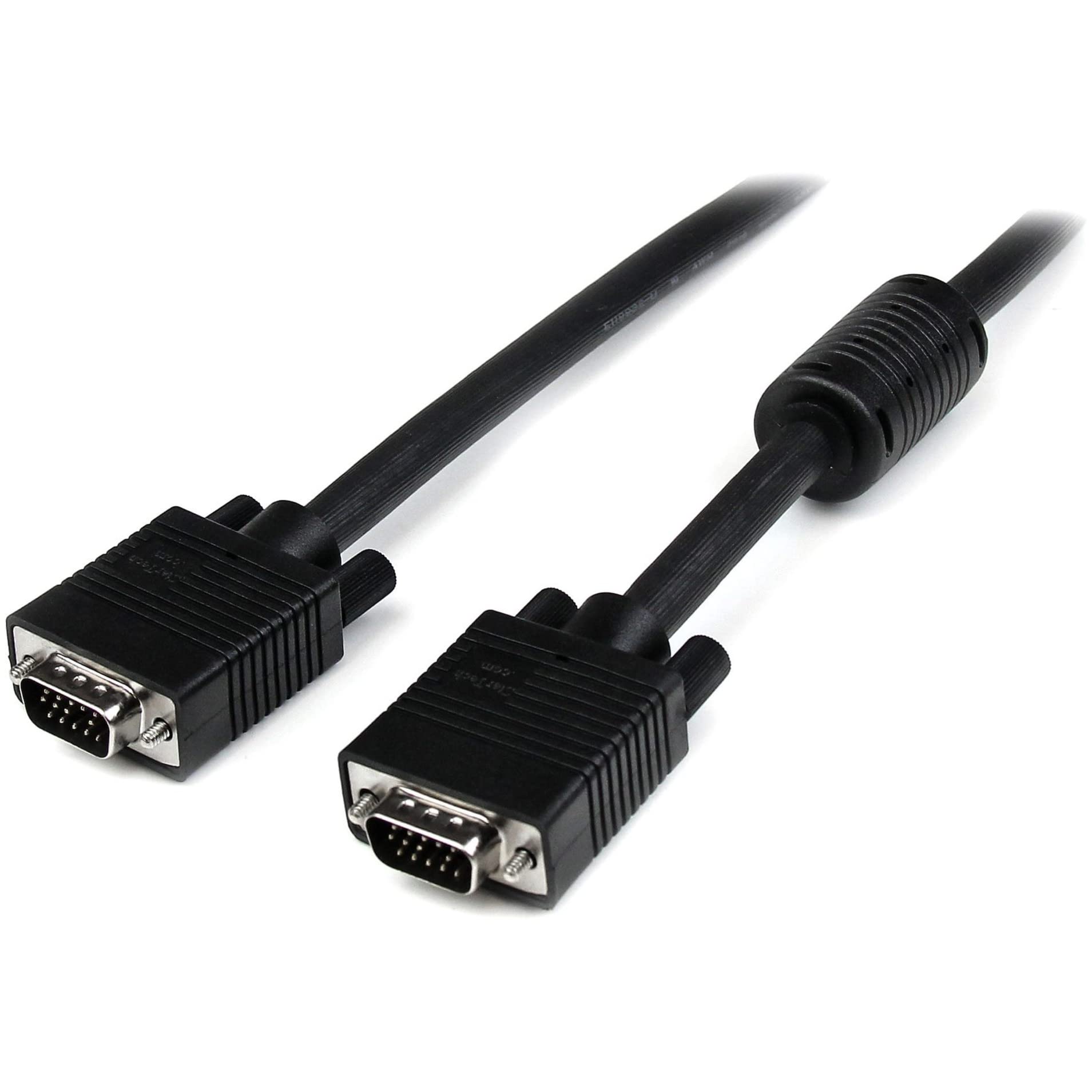
Q: What type of connectors does this VGA cable have?A: This VGA cable features two HD15 male connectors. These are standard connectors for VGA connections, ensuring compatibility with most displays.
Q: What resolution is this VGA cable suitable for?A: This cable supports high resolutions of up to one thousand nine hundred twenty by one thousand two hundred. It's ideal for high-quality video applications.
Q: Is this cable compatible with all VGA devices?A: Yes, this cable is compatible with all devices that have HD15 VGA ports. This includes many computers, monitors, and projectors.
Q: How do I connect the StarTech VGA cable?A: Simply plug one HD15 connector into your computer and the other into your monitor. Make sure both devices are powered off during the connection.
Q: Can I use this cable for gaming?A: Yes, you can use this VGA cable for gaming. It provides high-resolution video quality, enhancing the gaming experience on compatible monitors.
Q: How do I maintain this VGA cable?A: To maintain the VGA cable, keep it away from extreme heat and avoid bending it excessively. Regularly check for any visible damage.
Q: Is the StarTech VGA cable durable?A: Yes, this VGA cable is durably constructed. It features a coaxial design that reduces interference and enhances longevity.
Q: What should I do if the cable is not working?A: If the cable is not working, check the connections to ensure they are secure. If issues persist, try using the cable with another device.
Q: What kind of interference protection does this cable have?A: This cable provides superior EMI interference protection. It uses ferrite cores near the connector ends to reduce signal interference.
Q: Can I use this cable for presentations?A: Yes, this VGA cable is suitable for presentations. Its high-quality video transmission makes it perfect for connecting to projectors.
Q: What is the color of the StarTech VGA cable?A: The cable is black in color. This neutral color fits well with most electronic setups.
Q: Is this cable suitable for high-definition displays?A: Yes, it is suitable for high-definition displays. This cable supports resolutions of one thousand nine hundred twenty by one thousand two hundred and above.
Q: What materials is the StarTech VGA cable made from?A: The cable is made with high-quality coaxial materials. This construction enhances its performance and durability.
Q: What is the weight of the StarTech VGA cable?A: The weight of the StarTech VGA cable is approximately six point three ounces. This lightweight design makes it easy to handle and transport.
Q: Is this cable easy to install?A: Yes, this cable is very easy to install. Simply connect the two HD15 connectors to the appropriate ports on your devices.