

Cart
0


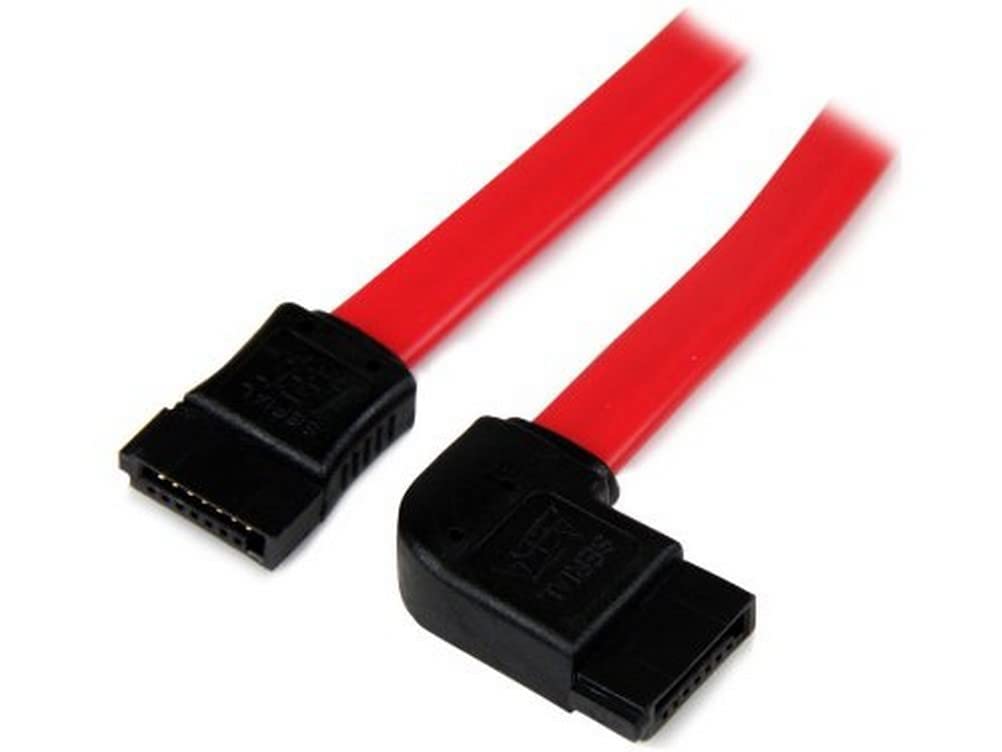
Startech.Com 18In Sata To Left Side Angle Sata Serial Ata Cable Straight To Left Side Angled Sata Cable 18 Inch
Vendor: Startech.Com
Type: USB & Lightning Cables
Sku: WBECCB00AKS0YL2
Availability: Sold Out
Couldn't load pickup availability
Guarantee safe checkout

Sold by Electroeshop, an authorized reseller.
Returns accepted within 30 days | support@electroeshop.com
Shipping Information
- Free Standard Shipping — United States only
- Processing Time: 1–3 business days
- Estimated Delivery: 3–5 business days after dispatch
- Double-boxed, fully insured & discreetly packaged
- Tracking number sent via email once dispatched
- Orders over $250 require signature upon delivery. Taxes calculated at checkout.
Returns & Refund
Returns accepted within 30 days of delivery.
Damaged or Defective Item
Free return shipping + replacement or full refund
Wrong Item Received
Free return shipping + replacement or full refund
Change of Mind
Return shipping at customer's expense · 25% restocking fee applies
All returns require a Return Authorization (RA) number before sending.
View Full Return & Refund Policy
Startech.Com 18In Sata To Left Side Angle Sata Serial Ata Cable Straight To Left Side Angled Sata Cable 18 Inch
$26.48

Frequently Asked Questions
- Q: What is the length of the StarTech.com SATA cable? A: The length of the StarTech.com SATA cable is eighteen inches. This length is ideal for connecting components in tight spaces.
- Q: What type of connectors does the SATA18LSA1 cable have? A: The SATA18LSA1 cable features one straight SATA connector and one left side-angled SATA connector. This design allows for better cable management and airflow.
- Q: What is the maximum data transfer speed supported by this cable? A: This cable supports full SATA 3.0 bandwidth of up to six gigabits per second. It is compatible with SATA 3.0 compliant drives.
- Q: Is this cable compatible with both 2.5 and 3.5 inch hard drives? A: Yes, this cable is compatible with both two point five inch and three point five inch SATA hard drives. This versatility makes it suitable for various setups.
- Q: How does the design of the SATA cable improve airflow? A: The flexible low-profile design of the SATA cable helps improve airflow inside your computer case. It reduces clutter, keeping the case clean and cool.
- Q: How do I install the StarTech.com SATA cable? A: To install the SATA cable, connect the straight end to the SATA port on your motherboard and the left side-angled end to your hard drive. Ensure a snug fit for optimal performance.
- Q: Is the StarTech.com SATA cable easy to manage in a crowded case? A: Yes, the left side-angled connector design makes it easier to manage in crowded cases. It allows for a more efficient layout of your components.
- Q: Can I use this cable for external drive connections? A: No, this SATA cable is designed for internal use only. It is intended for connecting internal hard drives to motherboards.
- Q: What warranty does the StarTech.com SATA cable come with? A: This cable is backed by a lifetime warranty. This ensures reliability and peace of mind for users.
- Q: How should I clean the SATA cable if it gets dirty? A: To clean the SATA cable, gently wipe it with a soft, dry cloth. Avoid using liquids or abrasive materials to prevent damage.
- Q: Is the SATA18LSA1 cable made from high-quality materials? A: Yes, the SATA18LSA1 cable is constructed from top-quality materials. This ensures optimum performance and reliability during use.
- Q: What is the best way to store the SATA cable when not in use? A: Store the SATA cable in a cool, dry place away from direct sunlight. Keeping it coiled can prevent tangles and damage.
- Q: What should I do if the SATA cable arrives damaged? A: If the SATA cable arrives damaged, you should contact the seller for a replacement. Most retailers will have a return policy in place for such situations.
- Q: Is this SATA cable suitable for beginner computer builders? A: Yes, this SATA cable is suitable for beginner computer builders. Its straightforward design makes installation easy and hassle-free.
- Q: Can I use this cable with a motherboard that supports SATA 2.0? A: Yes, this cable is backward compatible with SATA 2.0 motherboards. You can use it with older drives without any issues.