

Cart
0


Moto Xt22715 Us 3+32 Db Ss
Vendor: Lenovo
Type: Unlocked Phones
Sku: WBELEB0C31XV48P
Availability: Sold Out
Couldn't load pickup availability
Guarantee safe checkout

Sold by Electroeshop, an authorized reseller.
Returns accepted within 30 days | support@electroeshop.com
Shipping Information
- Free Standard Shipping — United States only
- Processing Time: 1–3 business days
- Estimated Delivery: 3–5 business days after dispatch
- Double-boxed, fully insured & discreetly packaged
- Tracking number sent via email once dispatched
- Orders over $250 require signature upon delivery. Taxes calculated at checkout.
Returns & Refund
Returns accepted within 30 days of delivery.
Damaged or Defective Item
Free return shipping + replacement or full refund
Wrong Item Received
Free return shipping + replacement or full refund
Change of Mind
Return shipping at customer's expense · 25% restocking fee applies
All returns require a Return Authorization (RA) number before sending.
View Full Return & Refund Policy
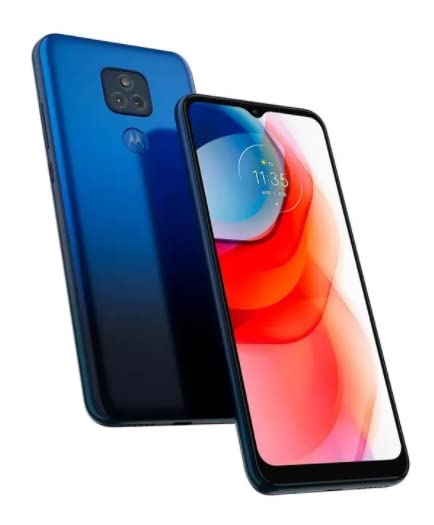
Moto Xt22715 Us 3+32 Db Ss
$134.11

Frequently Asked Questions
- Q: What are the dimensions of the Lenovo PAVA0005US Moto G Play? A: The dimensions are one point seventy-three inches in length, three point fifty-four inches in width, and seven inches in height. This compact size makes it easy to handle and carry.
- Q: What is the weight of the Lenovo Moto G Play? A: The weight is zero point seven ninety pounds. This lightweight design contributes to its portability and ease of use.
- Q: What color options are available for this smartphone? A: The Lenovo PAVA0005US is available in navy blue. This color adds a sleek and modern look to the device.
- Q: What features does the Lenovo Moto G Play have? A: This smartphone features a six point five-inch display and comes unlocked for any carrier. It also has three gigabytes of RAM and thirty-two gigabytes of internal storage.
- Q: What type of batteries does the Lenovo Moto G Play use? A: It uses lithium-ion batteries. This type of battery is known for its high energy density and longevity.
- Q: How do I set up my Lenovo Moto G Play smartphone? A: To set up your device, power it on and follow the on-screen instructions to select your language and connect to Wi-Fi. You can then sign in to your Google account to access apps and services.
- Q: Is the Lenovo Moto G Play suitable for gaming? A: Yes, the Moto G Play is equipped with a Mediatek Helio G37 octa-core processor, making it suitable for casual gaming. Its performance is optimized for handling various applications smoothly.
- Q: How do I install apps on the Lenovo Moto G Play? A: You can install apps through the Google Play Store pre-installed on the device. Simply open the app, search for the desired application, and tap 'Install' to download it.
- Q: Can I use the Lenovo Moto G Play with any carrier? A: Yes, this smartphone is unlocked, allowing you to use it with any GSM carrier. Just insert your SIM card to start using it.
- Q: What is the best way to clean my Lenovo Moto G Play? A: To clean your smartphone, use a soft, lint-free cloth slightly dampened with water. Avoid using harsh chemicals or abrasive materials to keep the screen and casing scratch-free.
- Q: How do I ensure the battery lasts longer on my Lenovo Moto G Play? A: To prolong battery life, reduce screen brightness, close unused apps, and turn off location services when not in use. These practices can help you maximize battery performance.
- Q: What should I do if my Lenovo Moto G Play gets damaged? A: If your device is damaged, check if it's under warranty for possible repairs. Otherwise, you can take it to an authorized service center for assessment and potential repair options.
- Q: What is the return policy for the Lenovo Moto G Play? A: The return policy typically allows for returns within thirty days of purchase, provided the device is in original condition with all accessories included. Always check the specific retailer's policy.
- Q: How do I update the software on my Lenovo Moto G Play? A: To update the software, go to 'Settings', then 'System', and select 'Software Update'. If an update is available, follow the prompts to download and install it.
- Q: Is the Lenovo Moto G Play water-resistant? A: No, the Lenovo Moto G Play is not water-resistant. It is advisable to keep the device away from water to prevent damage.