

Cart
0


Manhattan Vga Cable Hd 15 (M) Hd 15 (M) 10 Ft Molded Grey Color
Vendor: Manhattan
Type: USB & Lightning Cables
Sku: WBECCB00173JINO
Availability: In Stock
Couldn't load pickup availability
Guarantee safe checkout

Sold by Electroeshop, an authorized reseller.
Returns accepted within 30 days | support@electroeshop.com
Shipping Information
- Free Standard Shipping — United States only
- Processing Time: 1–3 business days
- Estimated Delivery: 3–5 business days after dispatch
- Double-boxed, fully insured & discreetly packaged
- Tracking number sent via email once dispatched
- Orders over $250 require signature upon delivery. Taxes calculated at checkout.
Returns & Refund
Returns accepted within 30 days of delivery.
Damaged or Defective Item
Free return shipping + replacement or full refund
Wrong Item Received
Free return shipping + replacement or full refund
Change of Mind
Return shipping at customer's expense · 25% restocking fee applies
All returns require a Return Authorization (RA) number before sending.
View Full Return & Refund Policy
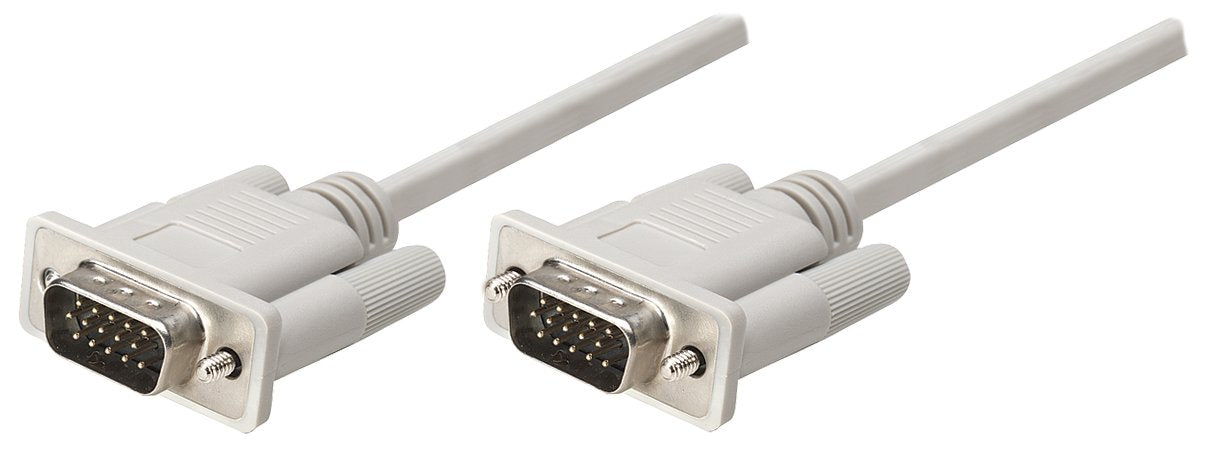
Manhattan Vga Cable Hd 15 (M) Hd 15 (M) 10 Ft Molded Grey Color
$15.99

Frequently Asked Questions
- Q: What is the length of the Manhattan VGA cable? A: The length of the Manhattan VGA cable is ten feet. This length is ideal for connecting devices that are placed further apart.
- Q: What materials are used in the construction of this VGA cable? A: This VGA cable is made from high-quality PVC and features mini-coax and paired-video-wire construction. These materials enhance durability and signal quality.
- Q: What type of connector does this VGA cable have? A: The cable has HD 15 male connectors on both ends. This allows for easy connection to VGA displays and devices.
- Q: How do I connect the Manhattan VGA cable? A: To connect the Manhattan VGA cable, simply plug one HD 15 male connector into your computer and the other into your monitor. Ensure both devices are powered off during the connection.
- Q: Is this VGA cable suitable for gaming? A: Yes, this VGA cable is suitable for gaming. It delivers clear and crisp images, making it ideal for gaming monitors.
- Q: Can I use this VGA cable with a laptop? A: Yes, you can use this VGA cable with a laptop. It connects seamlessly to laptops that have an HD 15 output.
- Q: How should I clean the VGA cable? A: To clean the VGA cable, use a soft, dry cloth. Avoid using liquids or harsh chemicals to prevent damage to the cable.
- Q: Is this cable safe for long-distance connections? A: Yes, this cable is designed for long-distance connections. It features full foil shielding to reduce signal interference over extended distances.
- Q: What precautions should I take when using the VGA cable? A: When using the VGA cable, avoid bending it sharply and keep it away from heat sources. This will help maintain its integrity and performance.
- Q: How do I store the VGA cable when not in use? A: Store the VGA cable in a cool, dry place, preferably coiled gently to avoid kinks. This helps prolong its lifespan.
- Q: Can this VGA cable be used with a projector? A: Yes, this VGA cable can be used with a projector that has an HD 15 input. It provides a reliable connection for presentations.
- Q: Is this cable compatible with video splitters? A: Yes, this cable is compatible with video splitters. It works well with devices that have HD 15 connections.
- Q: How does this VGA cable compare to HDMI cables? A: This VGA cable is mainly used for analog signals, while HDMI cables support digital signals. Choose based on your device compatibility.
- Q: What if the VGA cable arrives damaged? A: If the VGA cable arrives damaged, contact the seller for a replacement or return. Most sellers have a return policy for such issues.
- Q: Is there a warranty for the Manhattan VGA cable? A: Yes, the Manhattan VGA cable typically comes with a warranty. Check the packaging or retailer's site for specific warranty details.
- Q: How can I troubleshoot a connection issue with the VGA cable? A: If you experience connection issues, check that both ends are securely connected. Additionally, ensure the monitor is set to the correct input source.