

Cart
0


Kefeya Laptop Screen Extender, 15.6'' Portable Monitor For Laptop With 120% Srgb, Fhd Ips & Usb To Hdmi Hub & 235 Rotation, Trip
Free Standard Shipping Across USA
Vendor: KEFEYA
Type: Monitors & Displays
Sku: WBEEAB0D9M3H74L
Availability: Sold Out
Couldn't load pickup availability
Guarantee safe checkout

Sold by Electroeshop, an authorized reseller.
Returns accepted within 30 days | support@electroeshop.com
Shipping Information
- Free Standard Shipping — United States only
- Processing Time: 3–5 business days
- Estimated Delivery: 6–10 business days after dispatch
- Double-boxed, fully insured & discreetly packaged
- Tracking number sent via email once dispatched
Returns & Refund
Returns accepted within 30 days of delivery.
Damaged or Defective Item
Free return shipping + replacement or full refund
Wrong Item Received
Free return shipping + replacement or full refund
Change of Mind
Return shipping at customer's expense · 25% restocking fee applies
All returns require a Return Authorization (RA) number before sending.
View Full Return & Refund Policy
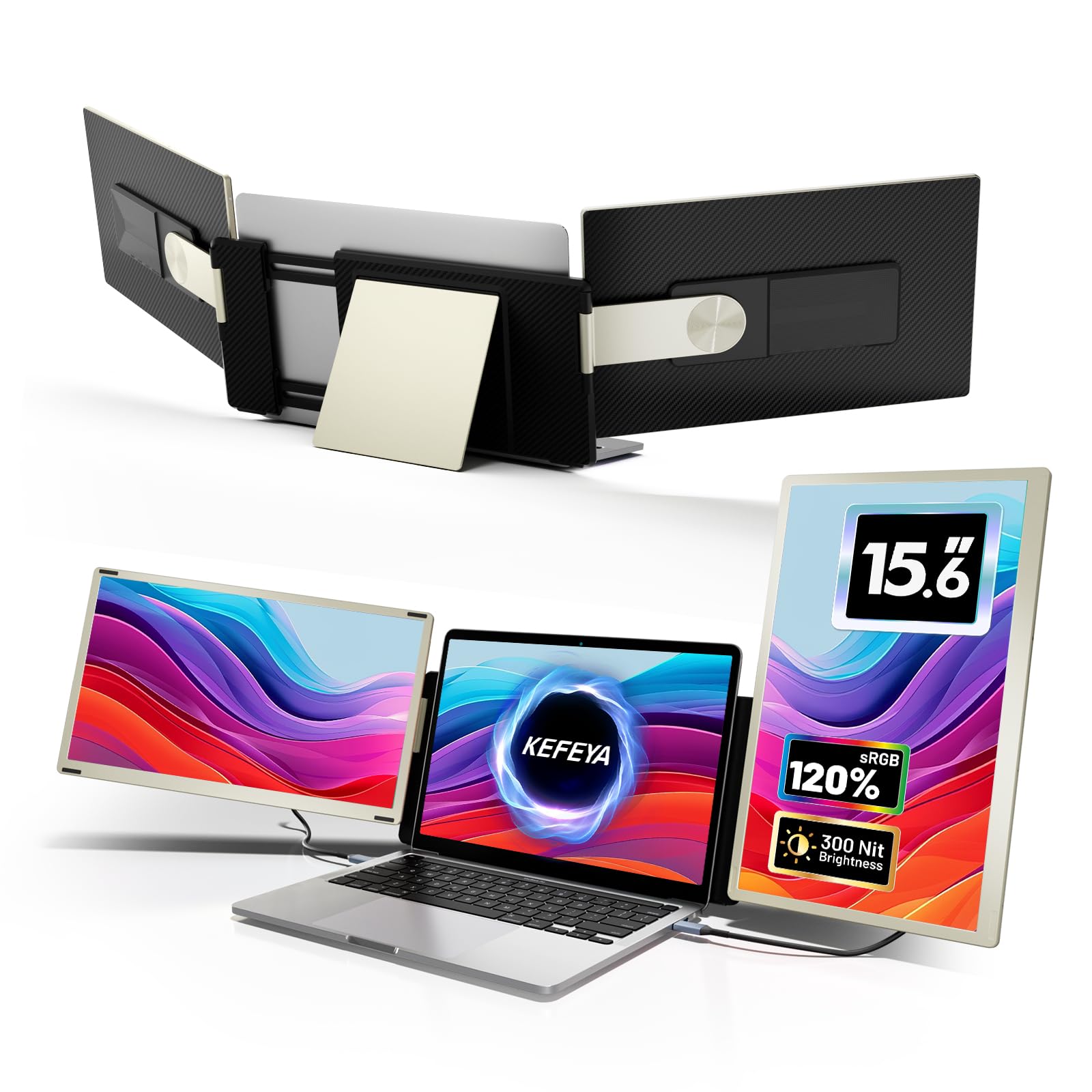
Kefeya Laptop Screen Extender, 15.6'' Portable Monitor For Laptop With 120% Srgb, Fhd Ips & Usb To Hdmi Hub & 235 Rotation, Trip
$343.41

Frequently Asked Questions
- Q: What are the dimensions of the KEFEYA Laptop Screen Extender? A: The KEFEYA Laptop Screen Extender measures fourteen point twenty-one inches in length, nine point sixty-nine inches in width, and one point eighty-one inches in height.
- Q: What is the weight of the KEFEYA Laptop Screen Extender? A: The total weight of the KEFEYA Laptop Screen Extender is approximately four point fifteen pounds, with each individual screen weighing only two point one pounds.
- Q: What color options are available for the KEFEYA Laptop Screen Extender? A: The KEFEYA Laptop Screen Extender is available in a stylish rose gold color.
- Q: What resolution does the KEFEYA Laptop Screen Extender offer? A: The KEFEYA Laptop Screen Extender supports full high definition resolution with a color gamut of one hundred twenty percent sRGB.
- Q: How do I connect the KEFEYA Laptop Screen Extender to my laptop? A: You can connect the KEFEYA Laptop Screen Extender using a full-featured USB-C port or by combining a USB-A port with an HDMI port.
- Q: Is the KEFEYA Laptop Screen Extender compatible with MacBooks? A: Yes, the KEFEYA Laptop Screen Extender is compatible with MacBooks, but you will need to purchase a customized hub for proper connection.
- Q: How do I rotate the screens on the KEFEYA Laptop Screen Extender? A: The screens on the KEFEYA Laptop Screen Extender can rotate up to two hundred thirty-five degrees, allowing for versatile viewing angles.
- Q: Can I use the KEFEYA Laptop Screen Extender for gaming? A: Yes, the KEFEYA Laptop Screen Extender can be used for gaming, providing an enhanced multi-screen experience.
- Q: How should I clean the KEFEYA Laptop Screen Extender? A: You can clean the KEFEYA Laptop Screen Extender using a soft, lint-free cloth. Avoid using harsh chemicals that may damage the screen.
- Q: How do I store the KEFEYA Laptop Screen Extender? A: To store the KEFEYA Laptop Screen Extender, use its magnetic frame for easy and compact storage. Ensure it is kept in a dry environment.
- Q: What should I do if my KEFEYA Laptop Screen Extender arrives damaged? A: If your KEFEYA Laptop Screen Extender arrives damaged, please contact customer service immediately for assistance with your return or replacement.
- Q: Is there a warranty for the KEFEYA Laptop Screen Extender? A: Yes, the KEFEYA Laptop Screen Extender comes with a warranty that covers manufacturing defects, ensuring peace of mind with your purchase.
- Q: Are there any specific laptop models the KEFEYA Laptop Screen Extender does not support? A: The KEFEYA Laptop Screen Extender is designed to fit all laptops, including those running on Mac, Windows, and Android platforms.
- Q: What if I experience connection issues with the KEFEYA Laptop Screen Extender? A: If you encounter connection issues, contact customer support with your laptop model information for prompt assistance.
- Q: Can I adjust the position of the screens on the KEFEYA Laptop Screen Extender? A: Yes, the screens can be adjusted with up to seven different combinations and multiple angles up to three hundred sixty degrees for flexibility.