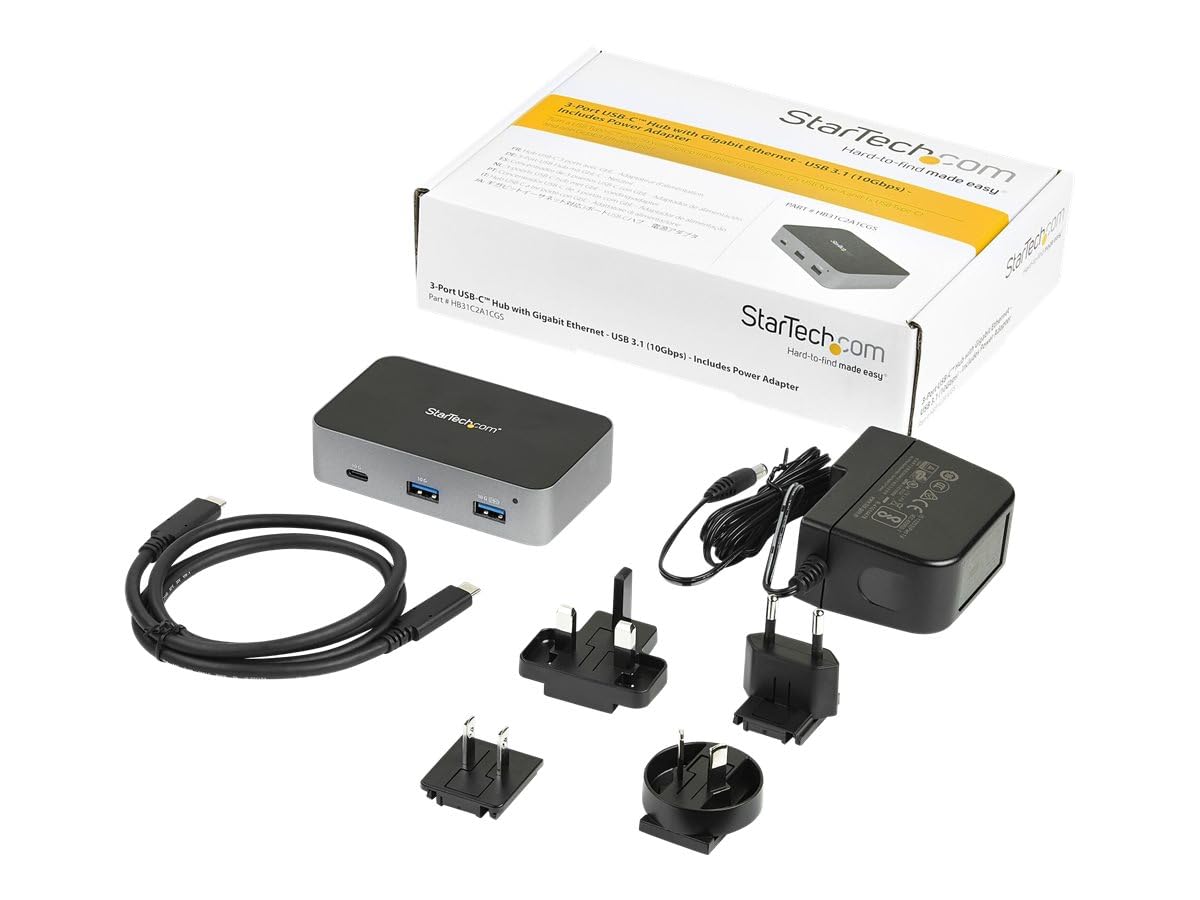
Expand The Connectivity Of Your Usb-C Laptop With This New Generation Usb-C 3.1 Gen 2 Hub Offering 10Gbps Supporting Greater Bus Bandwidth To Connected Devices And Faster Data Transfer Speeds. This Self-Powered 3-Port Usb-C Hub Plugs Into The Usb Type-C Trade; Or Thunderbolt Trade; 3 Port On Your Device, Adding One Lan Port, One Usb-C Port, And Two Usb-A Ports, So You Can Quickly Connect More Usb Devices. Gigabit Network Access For Faster And More Consistent Network Connections, The Usb 3.1 Gen 2 Hub #39; #39;S Integrated Gigabit Ethernet Port Provides Wired Network Access That Is Fully Compatible With Ieee 802.3/U/Ab Standards. The Gbe Port Also Supports Wake-On-Lan (Wol), So You Can Remotely Wake Your Computer Over Your Network. Easy Setup Amp; Installation This Compact, Lightweight Usb-Type-C Hub Is A Convenient And Compact Addition To Your Laptop Setup. The Hub Is Self-Powered And Includes A Universal Power Adapter To Provide Better Support Of Usb Devices, Such As External Storage, That May Draw More Power. The Usb-C Host Cable Is Detached And With An Extended Length Of 3.3 #39; #39; (1 M), It Provides More Flexibility For Longer Reach Connection Requirements And Plug And Play Installation. For Added Flexibility And Security, The Mini Hub Features Mounting Holes To Work With Startech.Com Dock Mounts Such As Sspmsvesa Or Sspmsudwm. Connect Usb-C Amp; Usb-A Peripherals With Ports For Both Usb-C And Usb-A Peripherals, This Hub Is Backwards Compatible Supporting Both Legacy And New Usb Devices. It Features One Always-On Usb-A Fast Charge Port Which Supports Two Modes Of Operation: Data Transfer And Charging When The Laptop Is Connected And On Dedicated Or Hostless Charging Which Provides A Higher Charging Current, When The Host Is Off, On Standby, Or Disconnected You Can Connect Video Capture Devices, Portable Flash Drives, And External Hard Drives, With Fast Data Transfer Speeds Of Up To 10 Gbps. This 3 Port Usb Type-C Hub Enhances Your Pro
⚠️ WARNING (California Proposition 65): This product may contain chemicals known to the State of California to cause cancer, birth defects, or other reproductive harm. For more information, please visit www.P65Warnings.ca.gov.
Frequently Asked Questions
Q: What are the dimensions of the Hub Alimentado Usbc 3 Puertos?A: The dimensions are ten inches in length, six inches in width, and two point five two inches in height. This compact design makes it easy to carry and use.
Q: What materials is the USB hub made of?A: The USB hub is made of aluminum, providing durability and a sleek appearance. This material also helps in effective heat dissipation.
Q: What is the power supply rating for this USB hub?A: The USB hub comes with a twenty-four watt power supply adapter. This allows for efficient charging and data transfer.
Q: How do I install the Hub Alimentado Usbc 3 Puertos?A: Simply plug the USB Type-C cable into your device's USB Type-C or Thunderbolt port. The hub is designed for plug-and-play installation.
Q: Is this hub compatible with older USB devices?A: Yes, this hub supports both USB-C and USB-A peripherals. It is backward compatible with legacy USB devices.
Q: Can I use this hub with my smartphone?A: Yes, the hub is compatible with USB-C smartphones. It allows you to connect various peripherals for enhanced functionality.
Q: How do I clean the USB hub?A: To clean the hub, use a soft, damp cloth to wipe its surface. Avoid using harsh chemicals or abrasive materials to prevent damage.
Q: Is there a warranty for the Hub Alimentado Usbc 3 Puertos?A: Yes, the USB hub typically comes with a limited warranty. Check with the manufacturer for specific warranty details.
Q: How should I store the USB hub when not in use?A: Store the USB hub in a cool, dry place, preferably in its original packaging to protect it from dust and physical damage.
Q: Can I connect multiple devices at once?A: Yes, you can connect multiple devices simultaneously through the hub's three ports. It supports efficient data transfer across all connected devices.
Q: What if the hub does not work after plugging it in?A: If the hub does not work, ensure that it is securely connected to the USB Type-C or Thunderbolt port. Try using a different port or device.
Q: Is the hub safe to use with my laptop?A: Yes, the hub is designed with safety features, including auto-grounding and compatibility with various operating systems. It is safe for everyday use.
Q: Does this USB hub support fast charging?A: Yes, the hub features an always-on USB-A fast charge port that supports up to one point five amperes while the laptop is connected.
Q: Is the USB hub easy to mount?A: Yes, the hub features mounting holes for secure installation on desks or walls. It can be easily mounted using compatible StarTech.com mounts.
Q: What operating systems are compatible with this hub?A: The USB hub supports Windows, macOS, Linux, iPadOS, and Android. Most versions allow for automatic driver installation.