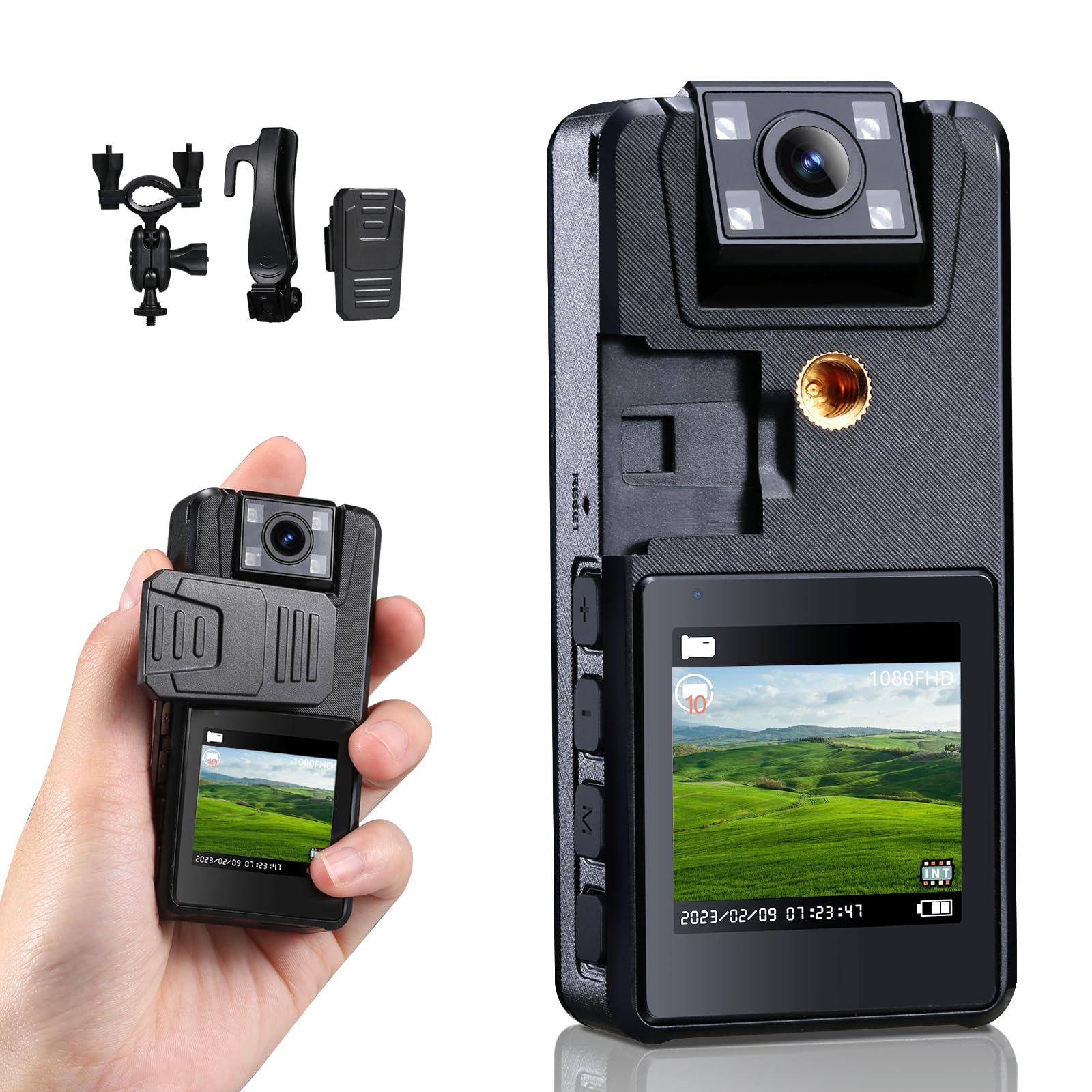
Hoestr A39 Body Camera With Audio And Video Specifications:&Nbsp Model: A39 Lightweight: 78G275Oz Dimensions: 35*16*06In Interface: Usb Type-C 20 Battery Capacity: 2500Mah Full Charge: 4 Hours Recorded Video Time: 10 Hours Recorded Audio Time: 18 Hours Memory: 64Gb Tf Memory Card Tf Card Support: 8Gb256Gb Tf Card Format: Only Fat32 Screen:154 In, 240*240 Resolution Video(Mov): 1296P, 1080Fhd, 1080P, 720P Functions: Record Video Or Audio Lens Wide Angle Approx: 120 Degrees Compatibility: Windowsmac Computer Ackage List: 1*Body Camera, 1*64Gb Tf Card, 3* Back Clips, 1*Usb-C Cable, 1*Manual How To Use (Please See The Video And Manual On The Web Page For Details) 1 Insert A Fat32 Formatted Memory Card (Max 256Gb) 2 Long Press The M Menu Key After Powering On To Enter The Local Menu To Format The Memory Card (You Cant Format The Memory On The Computer) 3 Enter The Menu To Set The Language And Time 4 One-Touch Updown Slide Videoaudio Recording 5 Usage Of Menu Key M After Powering On When There Is No Audiovideo Recording: Short Press The M Menu Button To Switch Between 3 Modes: File Browsing And Other 2 Modes In File Browsing Mode: Long Press The M Button To Delete Quickly In The Other 2 Modes, No Recording: Long Press The M Button To Enter Menu Reliable Hoestr: We Provide 24 Months Warranty, 24 Hours Online Support And Lifetime Customer Support If You Have Any Questions, Please Feel Free To Tell Us At Any Time, We Will Reply Within 24H
⚠️ WARNING (California Proposition 65): This product may contain chemicals known to the State of California to cause cancer, birth defects, or other reproductive harm. For more information, please visit www.P65Warnings.ca.gov.
Frequently Asked Questions
Q: What are the dimensions of the Hoestr A39 Body Camera?A: The dimensions are three and a half inches by one and six-tenths inches by six-tenths of an inch. This compact size makes it easy to carry and attach.
Q: How much does the Hoestr A39 Body Camera weigh?A: The weight of the camera is seventy-eight grams or two point seventy-five ounces. This lightweight design enhances portability for various activities.
Q: What is the battery capacity of the Hoestr A39 Body Camera?A: The battery capacity is three thousand milliamp hours. It supports up to ten hours of video recording and eighteen hours of audio recording.
Q: What video resolutions can the Hoestr A39 record in?A: The camera can record in resolutions of twelve hundred ninety-six pixels, one thousand eighty pixels, and seven hundred twenty pixels. This versatility allows for clear video capture.
Q: Does the Hoestr A39 Body Camera come with a memory card?A: Yes, it comes with a sixty-four gigabyte TF memory card included in the package. This memory card supports recordings of various lengths.
Q: How do I start recording with the Hoestr A39 Body Camera?A: To start recording, simply slide the corresponding button up or down. This quick action allows for immediate recording during emergencies.
Q: Can the Hoestr A39 Body Camera be used at night?A: Yes, it features infrared night vision for clear recording in low-light conditions. This allows for effective use even in dimly lit environments.
Q: How long does it take to fully charge the Hoestr A39 Body Camera?A: It takes approximately four hours to fully charge the camera. This quick charge time enables efficient use of the device.
Q: What is the recommended way to format the memory card?A: You should format the memory card using the camera's local menu, not on a computer. This ensures compatibility and proper functionality.
Q: How do I maintain the Hoestr A39 Body Camera?A: To maintain the camera, ensure the battery is charged, and the memory card is correctly formatted. Regularly check for firmware updates to ensure optimal performance.
Q: What is the warranty period for the Hoestr A39 Body Camera?A: The warranty period is twenty-four months. This warranty covers any non-human quality issues that may arise during use.
Q: Is the Hoestr A39 Body Camera compatible with Windows and Mac systems?A: Yes, it is compatible with both Windows and Mac computers. This allows for easy file transfer and management.
Q: How should I store the Hoestr A39 Body Camera?A: Store the camera in a cool, dry place when not in use. Ensure it is turned off and the battery is charged for optimal performance.
Q: What should I do if the Hoestr A39 Body Camera arrives damaged?A: If the camera arrives damaged, contact customer support within the warranty period for a prompt resolution. They provide assistance for returns or replacements.
Q: Can the Hoestr A39 Body Camera be used for professional purposes?A: Yes, it is suitable for professional use, including police enforcement and security. Its features make it ideal for various recording scenarios.