

Cart
0


Grandstream Wp825 Ip Phone - Cordless - Cordless - Wi-Fi, Bluetooth
Free Standard Shipping Across USA
Vendor: Grandstream
Type: VoIP Systems
Sku: WBEEAB0BJKP1H8F
Availability: Sold Out
Couldn't load pickup availability
Guarantee safe checkout

Sold by Electroeshop, an authorized reseller.
Returns accepted within 30 days | support@electroeshop.com
Shipping Information
- Free Standard Shipping — United States only
- Processing Time: 3–5 business days
- Estimated Delivery: 6–10 business days after dispatch
- Double-boxed, fully insured & discreetly packaged
- Tracking number sent via email once dispatched
Returns & Refund
Returns accepted within 30 days of delivery.
Damaged or Defective Item
Free return shipping + replacement or full refund
Wrong Item Received
Free return shipping + replacement or full refund
Change of Mind
Return shipping at customer's expense · 25% restocking fee applies
All returns require a Return Authorization (RA) number before sending.
View Full Return & Refund Policy
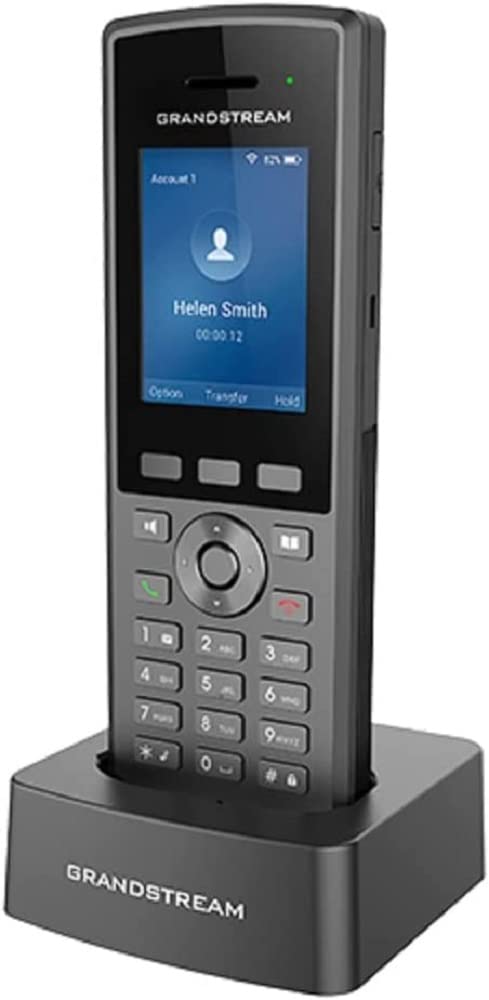
Grandstream Wp825 Ip Phone - Cordless - Cordless - Wi-Fi, Bluetooth
$172.25

Frequently Asked Questions
- Q: What are the dimensions of the Grandstream WP825 IP Phone? A: The dimensions of the Grandstream WP825 IP Phone are six point five inches in height, two point three inches in width, and one inch in depth.
- Q: What type of battery does the Grandstream WP825 use? A: The Grandstream WP825 uses a rechargeable two thousand milliamp hour lithium ion battery. This battery provides up to eight hours of talk time and two hundred hours of standby time.
- Q: How many SIP accounts and lines does the Grandstream WP825 support? A: The Grandstream WP825 supports two SIP accounts and two lines. This allows for versatile call management.
- Q: Does the Grandstream WP825 have Bluetooth capabilities? A: Yes, the Grandstream WP825 has integrated Bluetooth. You can connect Bluetooth headsets for hands-free communication.
- Q: What features enhance the audio quality of the Grandstream WP825? A: The Grandstream WP825 features HD voice quality, dual microphone design with Acoustic Echo Cancellation, and Noise Shield Technology. These features ensure clear and high-quality audio during calls.
- Q: How do you charge the Grandstream WP825 IP Phone? A: You can charge the Grandstream WP825 using its Micro USB port. Simply connect it to a power source with the included charging cable.
- Q: Is the Grandstream WP825 waterproof? A: Yes, the Grandstream WP825 is waterproof and dustproof. Its ruggedized design makes it drop-safe from a height of two point five meters.
- Q: How do I configure the push-to-talk button on the Grandstream WP825? A: You can configure the push-to-talk button through the phone’s settings menu. Follow the prompts to assign functions to the button as needed.
- Q: What is the standby time for the Grandstream WP825? A: The standby time for the Grandstream WP825 is approximately two hundred hours. This ensures it remains ready for use over long periods.
- Q: Can the Grandstream WP825 be used for outdoor activities? A: Yes, the Grandstream WP825 is designed for rugged use. Its waterproof and dustproof capabilities make it suitable for outdoor environments.
- Q: What is the warranty period for the Grandstream WP825? A: The warranty period for the Grandstream WP825 typically lasts for one year from the date of purchase. Check with the retailer for specific warranty details.
- Q: How can I return the Grandstream WP825 if needed? A: To return the Grandstream WP825, follow the return policy of the retailer where you purchased it. Ensure the product is in its original condition and packaging.
- Q: What common issues might I encounter with the Grandstream WP825? A: Common issues with the Grandstream WP825 may include connectivity problems or software glitches. Restarting the device often resolves these issues.
- Q: Is there a user manual available for the Grandstream WP825? A: Yes, a user manual is available for the Grandstream WP825. You can typically find it on the manufacturer's website or included in the product packaging.
- Q: How do I ensure the Grandstream WP825 remains in good condition? A: To keep the Grandstream WP825 in good condition, clean it regularly with a soft cloth and avoid exposing it to extreme temperatures.