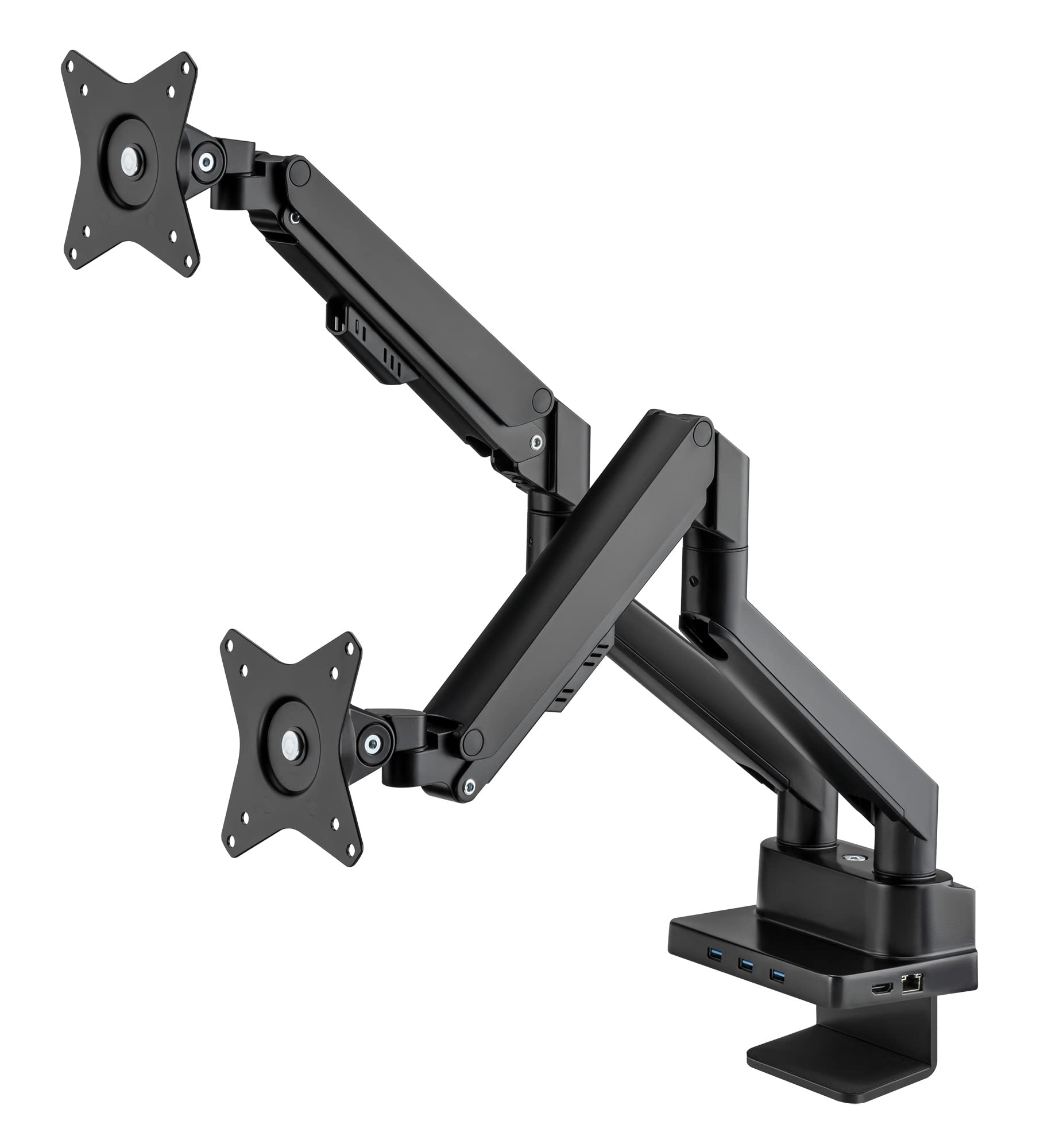
Improves Ergonomics, Frees Up Desk Space, And Lets You Connect To Your Display, Network And Peripherals While Charging Your Devices. Articulating Double-Link Swing Arms To Support Two 17'' To 32'' Monitors Up To 9 Kg (19.8 Lbs.) Each. Optimized Views With +45/-45 Tilt, 180 Swivel And 210 To 490 Mm (8.3 To 19.3 In.) Height Adjustment. Gas Spring For Light-Touch Viewing Adjustment. Supports 360 Rotation For Landscape Or Portrait Display Orientation. Mounting Options: C-Clamp At The Edge Of A Desk (For Surfaces 10 To 50 Mm [0.4 To 2 In.] Thick) Or Grommet Mounting Through A Drilled Hole (For Grommets 10 To 50 Mm [0.4 To 2 In. Wide). Built-In Tension Adjustment To Suit The Weight Of Your Monitors. Detachable Vesa-Plate Design For Easy Installation. Durable Aluminum Construction With Powder Coating. Built-In Cable Management To Minimize Clutter. Ideal For (Home) Office, Studio, It Network And Security Applications. Easy And Quick Installation, All Hardware Included. Meets Vesa Standards: 75X75, 100X100. Docking Station At Mount Base To Connect Your Display, Network And Peripherals While Charging Your Devices. Two Hdmi Ports With Resolutions On Single-Video Output Up To 4K@60Hz Or Dual-Video Output Up To 4K@30Hz. Supports Display Modes Mirror And Extended. Supports Display Modes Mirror And Extended (Mac Only Supports Mirror Mode). One Gigabit Ethernet (10/100/1000) Port For Faster Downloads, Media Streaming And Gaming. Supports 100 W Usb Power Delivery (Pd) Input With Up To 87 W Output Power; Requires An External Pd Charger - Available From Manhattan. Three Usb 3.2 Gen 1 (Formerly Usb 3.0) Type-A Ports With Superspeed Transfer Rates Up To 5 Gbps And Charging Up To 4.5 W (5 V / 0.9 A). Usb-A Ports To Connect Mice, Keyboards, Flash Drives And More Or To Charge And Sync Mobile Devices. Compliant With Displayport 1.2 Alternate Mode (Dp Alt Mode). Compatible With All Usb-C Dp-Alt-Mode-Supported Desktops, Notebooks And Tablets Including Macbook, Chromebook, Pixel And More. Lets Your Smartphone Work Like A Desktop Pc While Also Charging It (Desktop Setup Requires Devices With Android 9 Or Above That Offer Video Output Over Usb-C). Includes 1 M (3 Ft.) Usb 3.1 Gen 2 Usb-C Male To Usb-C Male Cable Supporting 10 Gbps And Pd Up To 100 W. Plug-And-Play Installation; Windows , Macos, Chrome Os And Android Compatible. Fully Hdcp 2.3 Compliant, Backward Compatible. Three-Year Warranty.|224.99|179.99|None|None|
⚠️ WARNING (California Proposition 65): This product may contain chemicals known to the State of California to cause cancer, birth defects, or other reproductive harm. For more information, please visit www.P65Warnings.ca.gov.
Frequently Asked Questions
Q: What is the maximum screen size this monitor mount can accommodate?A: This monitor mount can hold screens up to thirty-five inches in size. It's designed to support two monitors between seventeen and thirty-two inches.
Q: What materials is the Manhattan Dual Gas Spring Arms Monitor Desk Mount made from?A: The desk mount is made from aluminum, which provides sturdy and durable construction. The aluminum is also coated with powder for added protection.
Q: What are the dimensions of the Manhattan monitor mount?A: The dimensions of the monitor mount are approximately twenty-three point twenty-three inches in length, four point forty-one inches in width, and thirty-six point ninety-three inches in height.
Q: How do I install the Manhattan Dual Gas Spring Arms Monitor Desk Mount?A: To install the monitor mount, you can use the included C-clamp or hole clamp options. Make sure to follow the instructions for securing it to a table edge or through a mounting hole.
Q: Is this monitor mount suitable for heavy monitors?A: Yes, this mount can support monitors weighing up to nine kilograms per arm. It features built-in voltage adjustment for individual monitor weight.
Q: Can I adjust the height of the monitor arms?A: Yes, the monitor arms are height adjustable from two hundred ten millimeters to four hundred ninety millimeters. This allows for optimal viewing angles.
Q: What is the best way to clean the monitor mount?A: To clean the monitor mount, use a soft, damp cloth to wipe down the surfaces. Avoid using harsh chemicals that could damage the powder-coated finish.
Q: How do I manage cables with this monitor mount?A: This monitor mount includes integrated cable management features that help reduce cable clutter. You can easily route cables through the designated management channels.
Q: Is there a warranty for the Manhattan monitor mount?A: Yes, the Manhattan monitor mount comes with a three-year manufacturer's warranty. This covers defects in materials and workmanship.
Q: Can I rotate the monitors to switch between portrait and landscape modes?A: Yes, the monitors can be rotated three hundred sixty degrees, allowing you to easily switch between portrait and landscape orientations.
Q: What is the maximum surface thickness for the C-clamp installation?A: The C-clamp can be used on surfaces with a thickness between ten millimeters and fifty millimeters. Ensure your desk meets this requirement for secure installation.
Q: Are there any hazardous materials in this product?A: No, there are no hazardous materials listed for the Manhattan Dual Gas Spring Arms Monitor Desk Mount. It is safe for general use.
Q: Does this monitor mount require tools for installation?A: Yes, some basic tools may be required for installation, depending on your choice of mounting method. Make sure to have a screwdriver on hand.
Q: Can this monitor mount support multiple devices simultaneously?A: Yes, this mount includes an eight-in-one docking station that allows for connecting multiple devices, including two HDMI and three USB A ports.
Q: Is the monitor mount adjustable for different viewing angles?A: Yes, the mount allows for free movement of the arms with adjustments of plus forty-five to minus forty-five degrees and swivels up to one hundred eighty degrees for optimal viewing.