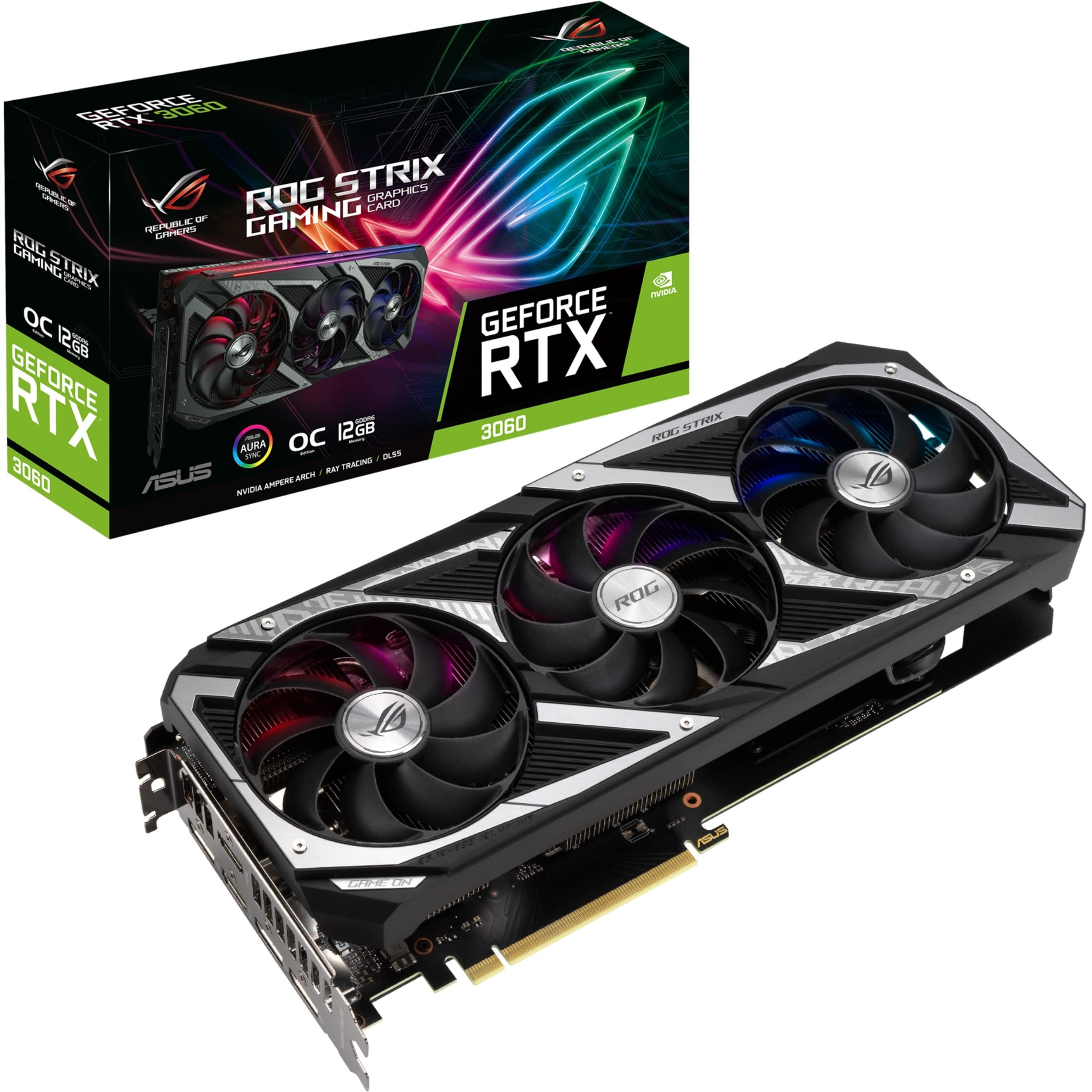
The ROG Strix GeForce RTX™ 3060 is a high-performance graphics card designed for gamers and content creators who demand exceptional visual fidelity and speed. Ideal for modern gaming, this GPU offers advanced rendering capabilities, enabling smooth gameplay and stunning graphics even in the most demanding environments.
Engineered with NVIDIA's Ampere architecture, the ROG Strix GeForce RTX™ 3060 delivers significant improvements in performance and efficiency. The innovative design features a robust heatsink and enhanced Axial-tech fans, which utilize a unique rotational scheme for optimal airflow and cooling. This ensures that the GPU maintains peak performance under heavy loads, allowing for extended gaming sessions without overheating.
Key Features:
NVIDIA Ampere Streaming Multiprocessors: Achieve 2X the FP32 throughput and enhanced power efficiency for unparalleled gaming performance.
2nd Generation RT Cores: Experience advanced ray tracing capabilities with 2X the throughput of the previous generation, enabling realistic lighting and shadows.
3rd Generation Tensor Cores: Benefit from up to 2X the throughput with advanced AI algorithms like DLSS, supporting resolutions up to 8K.
OC Mode: Enjoy boosted clock speeds of 1912 MHz in OC mode and 1882 MHz in Gaming mode for optimized performance.
Axial-Tech Fan Design: Features more fan blades with a reversed rotational direction for improved cooling efficiency and reduced noise levels.
Compact Dimensions: Measures 2.1"x5.3"x11.8", making it a suitable choice for a variety of PC builds.
Brand Reliability: Backed by ASUS, a trusted name in the hardware industry, ensuring quality and performance.
The ROG Strix GeForce RTX™ 3060 is perfect for gamers seeking high frame rates and stunning visuals in today's most demanding titles. Its advanced features and reliable design make it an excellent choice for both casual and competitive gaming, as well as for content creators looking to elevate their projects with professional-grade graphics. Experience the future of gaming with the ROG Strix GeForce RTX™ 3060, where performance meets innovation.
⚠️ WARNING (California Proposition 65): This product may contain chemicals known to the State of California to cause cancer, birth defects, or other reproductive harm. For more information, please visit www.P65Warnings.ca.gov.
Frequently Asked Questions
Q: What are the dimensions of the ASUS ROG Strix NVIDIA GeForce RTX 3060 V2 OC Edition?A: The dimensions are two point one inches in height, five point three inches in width, and eleven point eight inches in length.
Q: What type of memory does this graphics card use?A: This graphics card uses twelve gigabytes of GDDR6 memory, providing ample capacity for modern gaming and applications.
Q: What is the model number of this graphics card?A: The model number is ROG-STRIX-RTX3060-O12G-V2-GAMING, indicating it is part of the ROG Strix series from ASUS.
Q: How do I install the ASUS ROG Strix NVIDIA GeForce RTX 3060?A: To install, insert the graphics card into a compatible PCIe slot on your motherboard and connect any necessary power cables.
Q: What is the boost clock speed of this graphics card in OC mode?A: The boost clock speed in OC mode is one thousand nine hundred twelve megahertz, allowing for enhanced performance during gaming.
Q: Is this graphics card suitable for 4K gaming?A: Yes, this graphics card supports up to eight K resolution, making it suitable for high-definition gaming experiences.
Q: How do I keep my ASUS ROG Strix NVIDIA GeForce RTX 3060 in good condition?A: To maintain it, ensure proper airflow in your case and periodically clean the fans to prevent dust buildup.
Q: Does this graphics card have any special cooling features?A: Yes, it features an Axial-tech fan design with more blades and a reversed rotation for improved cooling efficiency.
Q: What should I do if my graphics card is not recognized by my computer?A: Check that the card is properly seated in the PCIe slot and ensure that all necessary power connectors are securely attached.
Q: Is there a warranty on the ASUS ROG Strix NVIDIA GeForce RTX 3060?A: Yes, ASUS typically offers a warranty on their graphics cards, but the duration may vary by region.
Q: Can this graphics card handle ray tracing?A: Yes, it includes second generation RT Cores that significantly enhance ray tracing performance.
Q: What kind of power supply do I need for this graphics card?A: A power supply with at least six hundred watts is recommended for optimal performance and to support system stability.
Q: Is this graphics card compatible with AMD motherboards?A: Yes, as long as the motherboard has a PCIe slot, it will work with both Intel and AMD systems.
Q: What is the cooling solution used in this graphics card?A: It utilizes a robust heatsink and an Axial-tech fan design to manage thermal loads effectively during high-performance tasks.
Q: How can I monitor the performance of my ASUS ROG Strix NVIDIA GeForce RTX 3060?A: You can use software like GPU Tweak II to monitor performance metrics and adjust settings for optimal gaming experiences.