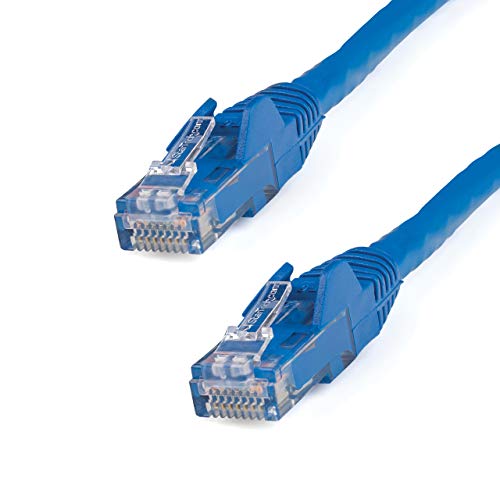
This Blue 7 Ft (2. 1 M) Cat6 Ethernet Cable Bulk 10 Pack Meets All Cat6 Cable Specifications, To Deliver A Reliable 10 Gigabit Network Connection. Protect Your Equipmentthese Blue Cat6 Patch Cords Are Built Using 100% Copper Wire And Are Tested To Comply With Tia/Eia-568-B. 1-2001 T568B Cat6 Requirements. We Dont Use Copper-Clad Aluminum (Cca) Wire, Which Is Subject To Problems Like Weak Power Delivery, Heat Buildup, Equipment Damage And Possibly Fire.The 50-Micron Gold Connectors Deliver Optimum Conductivity And Eliminate Signal Loss Due To Oxidation Or Corrosion. High-Quality Constructioneach Cat6 Ethernet Cable Is Manufactured Using High-Quality Copper Conductors And Carefully Constructed And Tested To Keep Near-End Crosstalk (Next) Well Within Acceptable Limits. The Patch Cables Are Constructed With 24 Awg Copper Wire, To Ensure Peak Performance For Demanding Ethernet Applications Such As Power-Over-Ethernet And 4K Or 1080P Video Streaming. Easily Install Your Network Cablesfor Trouble-Free Cable Runs, These Durable Cables Feature Snagless Connectors That Protect The Rj-45 Clips During Installation, Making Them Less Likely To Snag Or Break.The Cat6 Lan Cord Also Features Snagless Boots Which Offer Strain Relief By Stopping The Rj-45 Connectors From Bending At Sharp Angles. This Reduces The Risk Of Cable Damage, Which Could Decrease Network Connectivity And Performance.N6Patch7Bl10Pk Is Backed By A Startech Lifetime For Reliability.
⚠️ WARNING (California Proposition 65): This product may contain chemicals known to the State of California to cause cancer, birth defects, or other reproductive harm. For more information, please visit www.P65Warnings.ca.gov.
Frequently Asked Questions
Q: What is the length of the StarTech.com CAT6 Ethernet cables?A: Each StarTech.com CAT6 Ethernet cable measures seven feet long, providing ample reach for various networking needs.
Q: What materials are used in these Ethernet cables?A: These cables are constructed with one hundred percent copper wiring, ensuring high conductivity and reliable performance.
Q: Are the connectors of the CAT6 cables snagless?A: Yes, the connectors are snagless, which helps prevent damage during installation and ensures easy handling.
Q: How do I install these CAT6 Ethernet cables?A: Simply connect the RJ45 connectors into your network devices. The snagless design makes installation straightforward and hassle-free.
Q: Can I use these cables for Power-over-Ethernet applications?A: Yes, these cables are suitable for Power-over-Ethernet applications, providing reliable power and data transmission.
Q: Is this CAT6 cable compatible with older standards?A: Yes, this CAT6 cable is compatible with Cat5e and earlier standards, ensuring versatility in networking setups.
Q: How should I clean these Ethernet cables?A: To clean the cables, gently wipe them with a soft, dry cloth. Avoid using any liquid cleaners that may damage the connectors.
Q: What is the warranty for the StarTech.com Ethernet cables?A: These cables come with a lifetime warranty from StarTech.com, ensuring reliability and peace of mind.
Q: Can I return the cable if it arrives damaged?A: Yes, if the cable arrives damaged, you can return it for a replacement or refund according to the retailer's return policy.
Q: How do these cables perform for video streaming?A: These cables are designed for high performance, making them ideal for streaming high-definition video, including four K and one thousand eighty P formats.
Q: What is the gauge of the wire used in these cables?A: The cables feature twenty-four AWG copper wire, which is optimal for maintaining signal integrity over long distances.
Q: Are these cables ETL verified?A: Yes, these CAT6 cables are ETL verified, ensuring they meet high standards for quality and performance.
Q: What color are the StarTech.com CAT6 Ethernet cables?A: These Ethernet cables are blue, making them easy to identify in your networking setup.
Q: What is the cable structure of the CAT6 cables?A: The cable structure consists of four pairs of unshielded twisted pairs (UTP), which helps reduce interference.
Q: What should I do if the cable doesn't work after installation?A: If the cable doesn't work, check the connections, ensure compatibility with your devices, and consider testing with another cable.
The 7-ft Cat6 cables are just what I needed to reach my router. They work fine, but I was a bit disappointed with how long they took to arrive. Almost a week!
A
Aisha Khatri
One cable didn’t work
I really liked the blue color of these cables, very eye-catching! But one out of the four I received was defective and wouldn’t connect. I’m hoping to get a replacement soon.
E
Emily Zhang
Solid cables for my home office
I got this 7 ft Cat6 cable pack in blue for my new home office setup. The cables are really reliable and have helped speed up my internet connection. No more buffering during video calls!