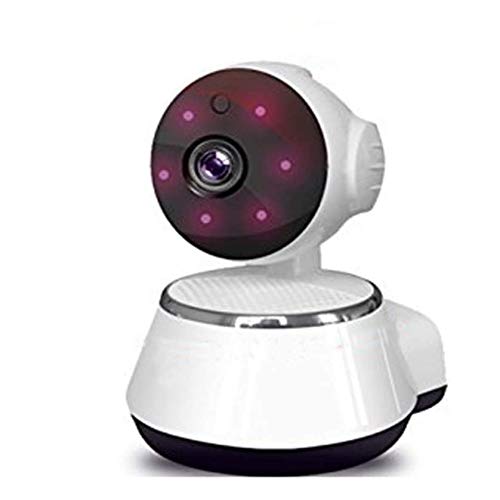
Cheap And Economic Model !!! If You Do Not Like It After Receive , Please Freely Contact Us , To Solve . We Will Solve Your Problem To Your Satisfactory . Product Description: *App : By V380 , Support Android And Ios , Scan Code On Manual To Download * Support More Than 1 Moible Phone To Watch Online At The Same Time * Support Wireless Ap Mode -- Monitor Locally W And Routing Connection Mode-- Monitor Online ,Need Camera To Be Connected To Your Router * 720P 1280*720(1.0Mp) *Image Sensor: 8135S+9712Sensor (720P 1280*720) *Lens: 3.6Mm *Resolution: 1280 X 720( 1.0Mp) *Cloud Adjustment: Horizontal: 0-355, *Vertical: -20 (Down)- 90 *Minimum Illumination: 0.02Lux@(F2.0, Agc On), 0Lux With Ir *Ir-Cut, Double Filter Automatic Switching, 5-10M(Depend) Infrared Distance *Compression Standard: H.264 *Video Frame Rate: 30Fps *Video Compression Data Rate: Hd(720P) Fluent(Vga) *Audio Compression Standard: Aopcm, Data Rate: Adaptive *Wireless Network Protocol: 2.4G Wi-Fi(Ieee802.11B), Not Work On 5G *Memory: Micro Sd Card Memory, Maximum Support 64G( Memory Card Not Included) *Power Supply: Dc 5V 1A Because System Errer Display 64Gb In Memory Storage Capacity, But Actually The Offer Does Not Contain Memory Card. Thank You For Understand. Large Quantity Of Best Price How To Use : Scan Code On Manual And Install App Onto Phone Turn On Camera Run App Add Camera Onto App Connection Finished Watch . Again Remind , Cheap And Economic Model ,If You Have High Video Quality Request ,Please Think It Over Again !!!
⚠️ WARNING (California Proposition 65): This product may contain chemicals known to the State of California to cause cancer, birth defects, or other reproductive harm. For more information, please visit www.P65Warnings.ca.gov.
Frequently Asked Questions
Q: What is the resolution of the camera?A: The camera has a resolution of one thousand two hundred eighty by seven hundred twenty pixels. This is classified as HD720P, providing clear video quality.
Q: What is the maximum memory capacity supported?A: The camera supports a maximum memory capacity of sixty-four gigabytes. However, please note that the memory card is not included with the purchase.
Q: What type of Wi-Fi does this camera use?A: The camera operates on a two point four gigahertz Wi-Fi network. It is not compatible with five gigahertz networks.
Q: What is the minimum illumination required for night vision?A: The minimum illumination required for night vision is zero point zero two lux. In complete darkness, it can still capture images with infrared light.
Q: How do I install the camera's app?A: To install the app, scan the code provided in the manual. This will lead you to download the V380 app for both Android and iOS devices.
Q: How do I connect the camera to my Wi-Fi?A: To connect the camera, turn it on after installing the app, then follow the app instructions to add the camera and set up the Wi-Fi connection.
Q: How do I clean the camera?A: To clean the camera, use a soft, dry cloth to wipe the exterior. Avoid using any harsh chemicals or abrasive materials that could scratch the lens.
Q: Is the camera safe for baby monitoring?A: Yes, this camera is safe for baby monitoring. It features a motion detection alarm and two-way audio for added security.
Q: What should I do if the camera doesn't connect to Wi-Fi?A: If the camera doesn't connect, check your Wi-Fi settings and ensure you are using a two point four gigahertz network. Restart both the camera and your router if necessary.
Q: How long can the camera record with sixty-four gigabytes of storage?A: The camera can save recordings for up to thirty days with sixty-four gigabytes of storage. This duration may vary based on recording settings.
Q: Can multiple users access the camera simultaneously?A: Yes, multiple mobile phones can access the camera online at the same time. This feature allows family members to monitor the camera together.
Q: What is the power supply requirement for the camera?A: The camera requires a power supply of five volts at one amp. Ensure you use the provided adapter for optimal performance.
Q: What features does the camera offer for night vision?A: The camera features IR night vision with automatic switching using a double filter. It can capture images in complete darkness at a range of five to ten meters.
Q: How do I resolve issues if the camera is not working properly?A: If the camera is not functioning correctly, refer to the troubleshooting section of the manual. You can also contact customer support for assistance.
Q: What is the warranty on the camera?A: The warranty policy may vary by manufacturer, so it is advisable to check with Super Tech for specific warranty details on this model.