

Cart
0

4500 Lumen Xga 1.7X Lcd Prjctr
Free Standard Shipping Across USA
Vendor: Nec
Type: Home Theater Projectors
Sku: WBEEAB097ZC24GF
Availability: Sold Out
Couldn't load pickup availability
Guarantee safe checkout

Sold by Electroeshop, an authorized reseller.
Returns accepted within 30 days | support@electroeshop.com
Shipping Information
- Free Standard Shipping — United States only
- Processing Time: 3–5 business days
- Estimated Delivery: 6–10 business days after dispatch
- Double-boxed, fully insured & discreetly packaged
- Tracking number sent via email once dispatched
Returns & Refund
Returns accepted within 30 days of delivery.
Damaged or Defective Item
Free return shipping + replacement or full refund
Wrong Item Received
Free return shipping + replacement or full refund
Change of Mind
Return shipping at customer's expense · 25% restocking fee applies
All returns require a Return Authorization (RA) number before sending.
View Full Return & Refund Policy
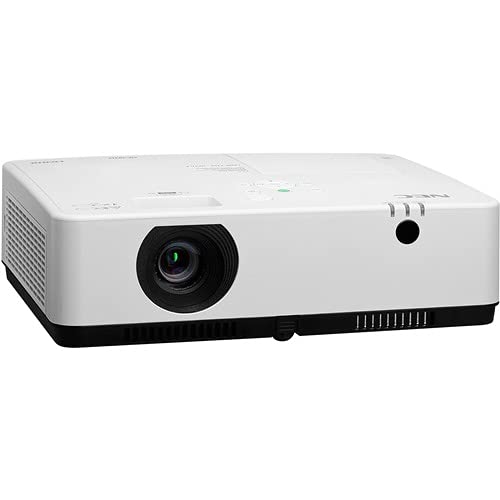
4500 Lumen Xga 1.7X Lcd Prjctr
$1,381.58

Frequently Asked Questions
- Q: What are the dimensions of the NEC Display NP-ME453X LCD Projector? A: The dimensions of the NEC Display NP-ME453X are four point three inches in height, thirteen point six inches in width, and ten point three inches in length. This compact size makes it suitable for various installation environments.
- Q: What is the native resolution of the NEC NP-ME453X projector? A: The native resolution of the NEC NP-ME453X is XGA, which is one thousand twenty-four by seven hundred sixty-eight pixels. This resolution ensures clear and detailed images for classroom presentations.
- Q: How long does the lamp last in the NEC NP-ME453X projector? A: The lamp in the NEC NP-ME453X projector lasts up to twenty thousand hours. This extended lamp life significantly reduces maintenance needs and overall costs.
- Q: How do I connect devices to the NEC NP-ME453X projector? A: You can connect devices to the NEC NP-ME453X projector using either wired or wireless connections. It supports screen sharing from up to sixteen devices simultaneously.
- Q: Is the NEC NP-ME453X suitable for large classrooms? A: Yes, the NEC NP-ME453X is suitable for large classrooms. Its bright four thousand five hundred lumens output ensures that images are visible from all areas of the room.
- Q: Can I remotely control the NEC NP-ME453X projector? A: Yes, you can remotely control the NEC NP-ME453X projector. It has wired and optional wireless network connectivity for easy management.
- Q: What type of speaker does the NEC NP-ME453X projector have? A: The NEC NP-ME453X features a powerful sixteen-watt speaker. This provides adequate volume for medium-sized classrooms.
- Q: Does the NEC NP-ME453X projector have ECO Mode? A: Yes, the NEC NP-ME453X projector includes ECO Mode technology. This feature helps maximize lamp life and reduce power consumption.
- Q: How do I clean the NEC NP-ME453X projector? A: To clean the NEC NP-ME453X projector, use a soft, dry cloth for the exterior and ensure the lens is free from dust. Regular maintenance keeps the projector functioning optimally.
- Q: Is the NEC NP-ME453X projector compatible with iOS devices? A: Yes, the NEC NP-ME453X projector is compatible with iOS devices. It supports screen sharing for various operating systems, including iOS.
- Q: What is the warranty period for the NEC NP-ME453X projector? A: The NEC NP-ME453X projector typically comes with a standard warranty period of three years. Check with the manufacturer for specific warranty details.
- Q: Can the NEC NP-ME453X projector be used for home theater? A: Yes, the NEC NP-ME453X can be used for home theater settings. Its high brightness and image quality make it suitable for viewing movies and presentations.
- Q: What types of inputs does the NEC NP-ME453X projector have? A: The NEC NP-ME453X projector includes dual HDMI inputs. This allows for quick switching between different video sources.
- Q: How do I set up the NEC NP-ME453X projector? A: To set up the NEC NP-ME453X projector, position it according to your desired mounting location and connect it to your power and video sources. Follow the user manual for detailed installation instructions.
- Q: What is the weight of the NEC NP-ME453X projector? A: The weight of the NEC NP-ME453X projector is approximately eight point six pounds. This weight allows for relatively easy transportation and installation.