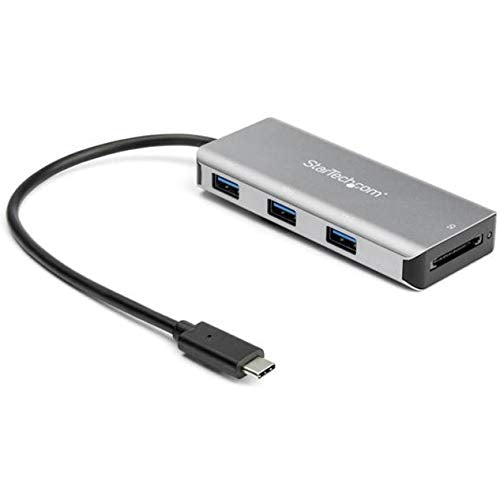
Expand The Connectivity Of Your Usb-C Laptop With This New Generation Usb 3.1 Gen 2 Hub Offering 10Gbps Supporting Greater Bandwidth To Connected Devices And Faster Data Transfer Speeds. Sd & Microsd Card Reader The Hub Provides Direct Access To Your Sd Memory Cards Or Microsd Cards As An Additional Medium For Data Storage And Data Transfer. Easy Setup This Compact, Lightweight Usb-Type-C Hub Is A Convenient And Portable Addition To Your Laptop Accessories. The Usb-C Cable Is Built-In And The Hub Is Bus-Powered, So It Draws Its Power Directly From Your Computers Usb-C Port With No External Power Required. That Means Fewer Cables To Carry With You When You Travel. The Self-Powered Usb C Splitter Can Draw Up To 15 Watts Of Power From The Connected Host And Operate Multiple Bus Powered Devices At One Time With The Total Available Power Dependent On The Connected Host. The Extended Length Attached Cable Of 9.8 (25 Cm) Provides More Flexibility For Longer Reach Connection Requirements And Plug And Play Installation. Connect Usb-C & A Peripherals With Ports For Both Usb-C And Usb-A Peripherals, This Hub Is Backwards Compatible Supporting Both Legacy And New Usb Devices. You Can Connect Flash Drives, Video Capture Devices And External Hard Drives, With Fast Data Transfer Speeds Of Up To 10Gbps. This Bus-Powered 3-Port Usb-C Hub Adds One Sd Card Reader And Three Usb-A Ports, So You Can Quickly Connect More Usb Devices. Hb31C2A1Cgb Is Backed By A Startech..
⚠️ WARNING (California Proposition 65): This product may contain chemicals known to the State of California to cause cancer, birth defects, or other reproductive harm. For more information, please visit www.P65Warnings.ca.gov.
Frequently Asked Questions
Q: What are the dimensions of the StarTech.com USB C Hub?A: The dimensions of the StarTech.com USB C Hub are four point one inches by one point eight inches by zero point six inches.
Q: What materials is the USB C Hub made of?A: The USB C Hub is made of durable aluminum, ensuring longevity and a lightweight design.
Q: How long is the attached cable of the USB C Hub?A: The attached cable of the USB C Hub is nine point eight inches long, providing flexibility for connections.
Q: How do I set up the StarTech.com USB C Hub?A: Setting up the USB C Hub is easy; just plug it into your USB-C port, and it is ready for use without any additional drivers.
Q: Is the USB C Hub compatible with my laptop?A: Yes, the USB C Hub is compatible with laptops that have USB-C or USB-A ports, supporting a range of devices.
Q: Can I use the USB C Hub with an external hard drive?A: Yes, you can connect an external hard drive to the USB C Hub, benefiting from data transfer speeds up to ten gigabits per second.
Q: How should I clean the USB C Hub?A: To clean the USB C Hub, use a soft, dry cloth to gently wipe the surface and avoid using abrasive materials.
Q: Is the USB C Hub safe for travel?A: Yes, the USB C Hub is compact and portable, making it a convenient option for travel without the need for external power.
Q: What should I do if the USB C Hub doesn't work?A: If the USB C Hub doesn't work, check the connections to ensure it is securely plugged into the USB-C port of your device.
Q: Does the USB C Hub support SD cards?A: Yes, the USB C Hub features a UHS-II SD card reader that supports various SD card formats for easy data access.
Q: Can I connect multiple devices to the USB C Hub at once?A: Yes, the USB C Hub allows you to connect multiple devices simultaneously, depending on the power availability from your computer.
Q: Is there a warranty for the USB C Hub?A: Yes, the StarTech.com USB C Hub typically comes with a warranty, ensuring protection against manufacturing defects.
Q: What operating systems are compatible with the USB C Hub?A: The USB C Hub supports a wide range of operating systems, including Windows, macOS, Linux, iPadOS, Chrome OS, and Android.
Q: Is the USB C Hub backwards compatible?A: Yes, the USB C Hub is backwards compatible, allowing you to connect both legacy USB devices and newer models.
Q: Can I use the USB C Hub while charging my laptop?A: Yes, the USB C Hub can be used while charging your laptop, as it is bus-powered and draws power from the laptop's USB-C port.