Key Features And Benefits:Cpu: Amd Ryzen 3 3250U Mobile Processor(Base 2.60Ghz, Up To 3.50Ghz, 2 Cores, 4Mb Cache, 4 Threads)Memory:16Gb Ddr4 Sdramhard Drive:512Gb Pcie Solid State Driveoperating System:Windows 10Display: 15.6-Inch Fhd (1920 X 1080) Anti-Glare Led Backlight Non-Touch Narrow Border Wva Displaytouchscreen:Noscreen Resolution: 1920 X 1080Backlit Keyboard:Noports: 1 Usb 2.0 Port2 Usb 3.2 Gen 1 Ports1 Headset (Headphone And Microphone Combo) Port1 Rj45 - 10/100Mbps Ethernet Port1 Hdmi 1.4 Port1 Power-Adaptervideo: Amd Radeon Graphicsaudio: Stereo Speakers With Waves Maxxaudiopromedia Drive:Multi-Format Sd Media Card Readeroptical Drive:Nonewireless Connectivity: 802.11Ac 1X1 Wifi And Bluetoothbuilt-In Hd Webcam With Microphone:Yesbattery:3-Cell, 42 Whr, Integrated Batterybluetooth:Yesweight:4.04 Poundscolor:White
⚠️ WARNING (California Proposition 65): This product may contain chemicals known to the State of California to cause cancer, birth defects, or other reproductive harm. For more information, please visit www.P65Warnings.ca.gov.
Frequently Asked Questions
Q: What is the screen size of the Dell C2423H monitor?A: The Dell C2423H monitor has a screen size of twenty-three point eight inches. This size provides ample space for multitasking and viewing content.
Q: What is the resolution of the Dell C2423H monitor?A: The resolution of the Dell C2423H monitor is one thousand nine hundred twenty by one thousand eighty pixels. This Full HD resolution ensures clear and sharp images.
Q: What are the dimensions of the Dell C2423H monitor?A: The dimensions of the Dell C2423H monitor are twenty-one inches in length, thirty-eight inches in width, and forty-nine inches in height. These dimensions make it suitable for various desk setups.
Q: What type of backlight does the Dell C2423H use?A: The Dell C2423H uses WLED backlight technology. This technology enhances visual clarity and provides vibrant colors.
Q: What inputs does the Dell C2423H support?A: The Dell C2423H monitor supports multiple inputs including DisplayPort one point two and HDMI one point four. It also has four SuperSpeed USB ports for connecting various devices.
Q: How do I adjust the height of the Dell C2423H monitor?A: You can adjust the height of the Dell C2423H monitor up to one hundred fifty millimeters. This allows for a comfortable viewing experience tailored to your needs.
Q: Can I connect two Dell C2423H monitors together?A: Yes, you can daisy chain two Dell C2423H monitors using a single DisplayPort cable. This setup can enhance productivity significantly.
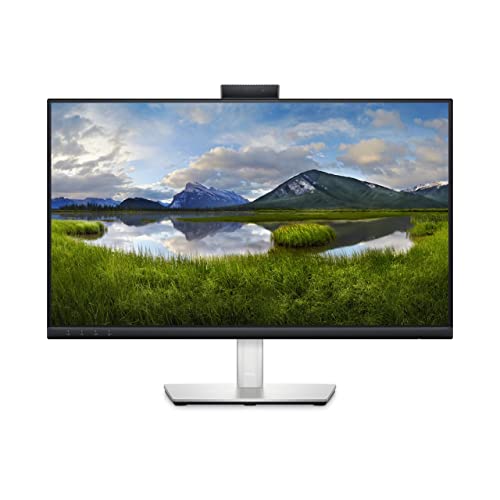
Q: How do I use the pop-up webcam on the Dell C2423H?A: To use the pop-up webcam on the Dell C2423H, simply push the webcam up to activate it. When not in use, push it down to hide it for privacy.
Q: Does the Dell C2423H monitor have built-in speakers?A: Yes, the Dell C2423H monitor features dual five-watt built-in speakers. This provides clear audio for video conferencing and media playback.
Q: How do I clean the screen of the Dell C2423H monitor?A: To clean the screen of the Dell C2423H, use a soft, lint-free cloth. Avoid using harsh chemicals, as they can damage the screen.
Q: What is the warranty period for the Dell C2423H monitor?A: The Dell C2423H monitor typically comes with a three-year warranty. This covers defects in materials and workmanship.
Q: Is the Dell C2423H monitor environmentally friendly?A: Yes, the Dell C2423H monitor is designed using eighty-five percent post-consumer recyclable plastic. It also meets various environmental standards.
Q: What is the response time of the Dell C2423H monitor?A: The response time of the Dell C2423H monitor is five milliseconds. This fast response time is ideal for watching movies and gaming.
Q: Does the Dell C2423H monitor support Windows Hello?A: Yes, the Dell C2423H monitor supports Windows Hello for password-free login. This feature utilizes secure facial recognition technology.
Q: What is the maximum brightness of the Dell C2423H monitor?A: The maximum brightness of the Dell C2423H monitor is two hundred fifty nits. This level of brightness ensures a clear display in various lighting conditions.