

Cart
0

Silver,, External 2.5'' Hdd Enclosure, Support Usb 2.0 (480 Mbits)
Free Standard Shipping Across USA
Vendor: Silverstone Technolo
Type: Hard Drive Enclosures
Sku: WBEEAB000FADIGS
Availability: Sold Out
Couldn't load pickup availability
Guarantee safe checkout

Sold by Electroeshop, an authorized reseller.
Returns accepted within 30 days | support@electroeshop.com
Shipping Information
- Free Standard Shipping — United States only
- Processing Time: 3–5 business days
- Estimated Delivery: 6–10 business days after dispatch
- Double-boxed, fully insured & discreetly packaged
- Tracking number sent via email once dispatched
Returns & Refund
Returns accepted within 30 days of delivery.
Damaged or Defective Item
Free return shipping + replacement or full refund
Wrong Item Received
Free return shipping + replacement or full refund
Change of Mind
Return shipping at customer's expense · 25% restocking fee applies
All returns require a Return Authorization (RA) number before sending.
View Full Return & Refund Policy
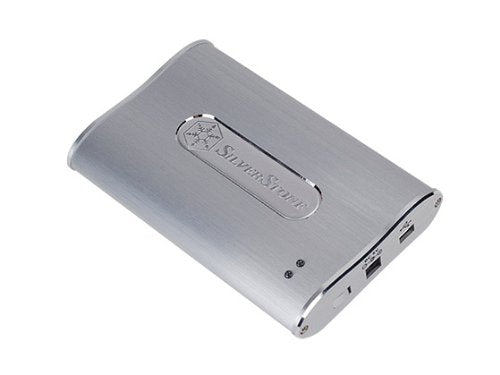
Silver,, External 2.5'' Hdd Enclosure, Support Usb 2.0 (480 Mbits)
$40.32

Frequently Asked Questions
- Q: What materials is the Silverstone MS02S made of? A: The Silverstone MS02S is made of all aluminum. This material not only provides durability but also offers a sleek and elegant finish.
- Q: What are the dimensions of the Silverstone MS02S? A: The Silverstone MS02S measures twenty-nine centimeters long, thirteen centimeters wide, and nine centimeters high. These compact dimensions make it highly portable.
- Q: What color options are available for the Silverstone MS02S? A: The Silverstone MS02S is available in silver. This color complements its modern and stylish design.
- Q: How do I install the Silverstone MS02S enclosure? A: To install the Silverstone MS02S, simply insert your 2.5-inch hard drive into the enclosure and connect it via USB. It’s designed for easy access and quick setup.
- Q: Is the Silverstone MS02S compatible with all 2.5-inch drives? A: Yes, the Silverstone MS02S is compatible with standard 2.5-inch IDE drives. This versatility allows you to use a wide range of hard drives.
- Q: Can I use the Silverstone MS02S for backup? A: Yes, the Silverstone MS02S includes easy-to-use software with a one-click auto backup feature. This makes it convenient for data storage and backup.
- Q: How should I clean the Silverstone MS02S enclosure? A: To clean the Silverstone MS02S, use a soft, dry cloth to wipe its surface. Avoid using harsh chemicals that could damage the aluminum finish.
- Q: Is the Silverstone MS02S safe for mobile use? A: Yes, the Silverstone MS02S is designed for high portability. It includes a USB Y-cable and an exclusive handbag for safe transport.
- Q: What is the warranty period for the Silverstone MS02S? A: The warranty period for the Silverstone MS02S is typically one year. Check with the retailer for specific warranty details.
- Q: What do I do if my Silverstone MS02S arrives damaged? A: If your Silverstone MS02S arrives damaged, contact the retailer for return instructions. Most retailers offer a satisfaction guarantee.
- Q: How does the Silverstone MS02S perform in terms of heat management? A: The Silverstone MS02S has excellent thermal management. Its aluminum design helps dissipate heat efficiently during operation.
- Q: Is the Silverstone MS02S suitable for beginners? A: Yes, the Silverstone MS02S is user-friendly and suitable for beginners. Its simple installation process and backup feature make it accessible.
- Q: Can I use the Silverstone MS02S with a Mac? A: Yes, the Silverstone MS02S is compatible with both Windows and Mac operating systems. You can easily connect it to either platform.
- Q: What is the maximum drive size for the Silverstone MS02S? A: The Silverstone MS02S supports up to two terabytes of storage capacity. This allows you to use high-capacity drives for extensive data storage.
- Q: What should I do if I encounter issues during setup? A: If you encounter issues during setup, refer to the user manual for troubleshooting tips. Additionally, customer support is available for further assistance.