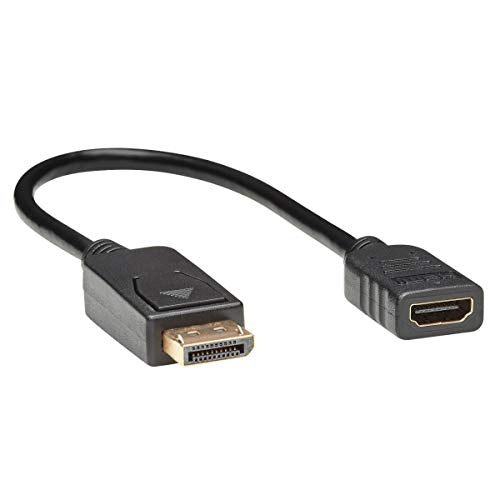
Save Money By Connecting Your New Displayport Laptop To An Existing Hdmi Display This Displayport To Hdmi Passive Adapter (M/F) Allows You To Play Stereo Audio And High-Definition Video From Your Displayport Computer Or Laptop On An Hdmi Television, Monitor Or Projector. You Can Continue Using Your Existing Hdmi Display And Hdmi Cable Without The Time, Effort Or Expense Of Replacing It With A New Dp Monitor. This One-Foot Cable Is An Easy, Inexpensive Way To Play 1080P Video In Classrooms, Conference Rooms, Trade Shows And Other On-The-Road Presentations. Transmits Outstanding 1080P Video For High-Definition Presentations Ideal For Classrooms, Lecture Halls And Anywhere Else You May Give A Presentation, This Displayport To Hdmi Converter Supports Computer Video Resolutions Up To 1920 X 1080 (At 60 Hz) And Hdtv Resolutions Up To 1080P With 36-Bit Deep Color. Watching Videos And Playing Games On A Large-Screen Hdmi Monitor Is Enhanced By The Cables Support Of 7. 1-Channel Surround Sound. It Also Complies With Hdcp 1. 3, Hdmi 1. 3 And Displayport 1. 1A Standards. Passive Adapters Require Displayport++ For Hdmi Pass Through Because It Is A Passive Adapter, The P136-001 Requires That The Connected Source Device Have A Displayport++ (Dp++) Dual-Mode Port, Which Allows Hdmi Signals To Pass Through. Check Your Displayport Sources Documentation For Compatibility. Ready To Use Right Out Of The Package Ideal For Displaying Video On A Large Monitor Or Digital Sign, Each P136-001 Cable Is Perfectly Sized For Carrying In Your Briefcase Or Laptop Bag For Convenient Use Anywhere. Just Connect The Male Dp End To Your Computers Displayport And The Female Hdmi End To An Hdmi Cable To Begin Sharing Hd Audio/Video Signals. The Plug-And-Play Adapter Requires No Software, Drivers Or External Power.
⚠️ WARNING (California Proposition 65): This product may contain chemicals known to the State of California to cause cancer, birth defects, or other reproductive harm. For more information, please visit www.P65Warnings.ca.gov.
Frequently Asked Questions
Q: What are the dimensions of the Tripp Lite DisplayPort to HDMI Video Adapter?A: The Tripp Lite DisplayPort to HDMI Video Adapter is one foot long. Its compact size makes it easy to carry and use in various settings.
Q: Is this adapter compatible with DisplayPort and HDMI standards?A: Yes, this adapter complies with HDCP 1.3, HDMI 1.3, and DisplayPort 1.1a standards. This ensures high-quality audio and video transmission.
Q: What video resolutions does this adapter support?A: This adapter supports video resolutions up to one thousand nine hundred twenty by one thousand eighty at sixty hertz. It also supports HDTV resolutions up to one thousand eighty p.
Q: How do I connect the Tripp Lite DisplayPort to HDMI Video Adapter?A: To use the adapter, connect the male DisplayPort end to your computer's DisplayPort and the female HDMI end to an HDMI cable. It's a plug-and-play device, requiring no additional software.
Q: Is this adapter suitable for use with a projector?A: Yes, this adapter is suitable for connecting a DisplayPort computer or laptop to an HDMI projector. It allows high-definition presentations with ease.
Q: Can I use this adapter for gaming?A: Yes, this adapter is ideal for gaming as it transmits up to one thousand eighty p video and supports seven point one channel surround sound. This enhances the gaming experience on larger screens.
Q: What should I check before using this adapter?A: You should ensure that your source device has a DisplayPort double plus port for HDMI pass-through. This is crucial for the passive adapter to function properly.
Q: How do I store the Tripp Lite DisplayPort to HDMI Video Adapter?A: Store the adapter in a safe place, preferably in a pouch or bag, to avoid damage. Its compact size allows for easy storage in a briefcase or laptop bag.
Q: What is the warranty on this product?A: Tripp Lite typically offers a limited lifetime warranty on its products, including this adapter. Check the manufacturer's website for specific details and terms.
Q: Can I use this adapter with a non-HDCP compliant display?A: No, this adapter requires an HDCP compliant display to function properly. Without HDCP compliance, you may experience video playback issues.
Q: Does this adapter require external power?A: No, the Tripp Lite DisplayPort to HDMI Video Adapter does not require external power. It is a plug-and-play device, making it very user-friendly.
Q: Is this adapter suitable for high-definition digital signage?A: Yes, this adapter is ideal for high-definition digital signage applications, supporting clear and vibrant video output up to one thousand eighty p.
Q: What color is the Tripp Lite DisplayPort to HDMI Video Adapter?A: The adapter is black, which is a neutral color that blends well with most electronic devices and environments.
Q: How do I troubleshoot if the adapter is not working?A: If the adapter is not working, ensure that both the DisplayPort and HDMI connections are secure. Also, check that your source device supports DisplayPort double plus.
Q: Is this adapter easy to use for presentations?A: Yes, this adapter is designed for ease of use in presentations. It requires no drivers and can be set up quickly for immediate use.